Middleware Architecture
摘要
keystonemiddleware 架构支持 OpenStack 项目之间使用的通用身份验证协议。 通过使用 keystone 作为通用的身份验证和授权机制,各种 OpenStack 项目可以利用现有的身份验证和授权系统。
在本文档中,我们描述了身份验证中间件的架构和职责,它充当基于 WSGI 标准的 OpenStack 项目的内部 API 机制。
本文档描述了 keystonemiddleware.auth_token 中的实现
Specification Overview
‘身份验证’是指确定用户是否就是他们所声称的身份的过程。 通常,使用诸如 HTTP Basic Auth、Digest Access、公钥、令牌等‘身份验证协议’来验证用户的身份。 在本文档中,我们将‘身份验证组件’定义为实现 OpenStack 服务身份验证协议的软件模块。 承载令牌是 OpenStack 中目前最常用的身份验证协议。
从高层来看,身份验证中间件组件是一个代理,它拦截来自客户端的 HTTP 调用,并在请求上下文中填充 HTTP 标头,供其他 WSGI 中间件或应用程序使用。 中间件处理的一般流程是
清除现有的授权标头以防止伪造
从现有的 HTTP 请求标头中收集令牌
验证令牌
如果有效,则填充表示已身份验证和授权的身份的其他标头
如果无效,或者没有令牌存在,则拒绝请求(HTTPUnauthorized)或传递一个标头,指示请求未授权(在中间件中可配置)
如果 keystone 服务不可用以验证令牌,则使用 HTTPServiceUnavailable 拒绝请求。
Authentication Component
以下显示了部署在 OpenStack 服务前面的身份验证组件的默认行为。
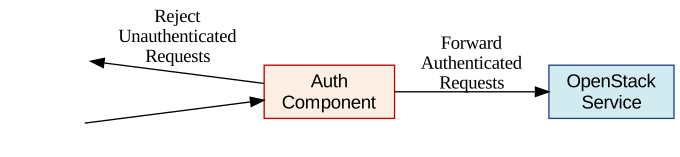
身份验证组件或中间件将拒绝任何未经验证的请求,仅允许经过身份验证的请求通过到 OpenStack 服务。
Authentication Component (Delegated Mode)
身份验证组件可以配置为以‘委托模式’运行。 在此模式下,拒绝或接受未经验证客户端的决定委托给 OpenStack 服务。
在此处,请求会连同一个身份状态消息一起转发到 OpenStack 服务,该消息指示客户端的身份是否已确认或不确定。 消耗的 OpenStack 服务决定是否应向客户端发送拒绝消息。

Deployment Strategy
该中间件旨在与 OpenStack WSGI 组件内联使用,基于 Oslo WSGI 中间件类。 它通常作为其他中间件组件的 paste 配置管道中的配置元素部署,管道终止于服务应用程序。 该中间件符合 python WSGI 标准 [PEP-333]。 在初始化中间件时,会将一个配置项(充当 python 字典)传递给中间件,其中包含相关的配置选项。
配置
中间件在主应用程序的配置文件中配置为 WSGI 组件。 auth_token 中间件的示例
[app:myService]
paste.app_factory = myService:app_factory

[pipeline:main]
pipeline = authtoken myService

[filter:authtoken]
paste.filter_factory = keystonemiddleware.auth_token:filter_factory
[DEFAULT]


[keystone_authtoken]

#
# From keystonemiddleware.auth_token
#

# Complete "public" Identity API endpoint. This endpoint should not be an
# "admin" endpoint, as it should be accessible by all end users.
# Unauthenticated clients are redirected to this endpoint to authenticate.
# Although this endpoint should ideally be unversioned, client support in the
# wild varies. If you're using a versioned v2 endpoint here, then this should
# *not* be the same endpoint the service user utilizes for validating tokens,
# because normal end users may not be able to reach that endpoint. (string
# value)
# Deprecated group/name - [keystone_authtoken]/auth_uri
#www_authenticate_uri = <None>

# DEPRECATED: Complete "public" Identity API endpoint. This endpoint should not
# be an "admin" endpoint, as it should be accessible by all end users.
# Unauthenticated clients are redirected to this endpoint to authenticate.
# Although this endpoint should ideally be unversioned, client support in the
# wild varies. If you're using a versioned v2 endpoint here, then this should
# *not* be the same endpoint the service user utilizes for validating tokens,
# because normal end users may not be able to reach that endpoint. This option
# is deprecated in favor of www_authenticate_uri and will be removed in the S
# release. (string value)
# This option is deprecated for removal since Queens.
# Its value may be silently ignored in the future.
# Reason: The auth_uri option is deprecated in favor of www_authenticate_uri
# and will be removed in the S  release.
#auth_uri = <None>

# API version of the Identity API endpoint. (string value)
#auth_version = <None>

# Interface to use for the Identity API endpoint. Valid values are "public",
# "internal" (default) or "admin". (string value)
#interface = internal

# Do not handle authorization requests within the middleware, but delegate the
# authorization decision to downstream WSGI components. (boolean value)
#delay_auth_decision = false

# Request timeout value for communicating with Identity API server. (integer
# value)
#http_connect_timeout = <None>

# How many times are we trying to reconnect when communicating with Identity
# API Server. (integer value)
#http_request_max_retries = 3

# Request environment key where the Swift cache object is stored. When
# auth_token middleware is deployed with a Swift cache, use this option to have
# the middleware share a caching backend with swift. Otherwise, use the
# ``memcached_servers`` option instead. (string value)
#cache = <None>

# Required if identity server requires client certificate (string value)
#certfile = <None>

# Required if identity server requires client certificate (string value)
#keyfile = <None>

# A PEM encoded Certificate Authority to use when verifying HTTPs connections.
# Defaults to system CAs. (string value)
#cafile = <None>

# Verify HTTPS connections. (boolean value)
#insecure = false

# The region in which the identity server can be found. (string value)
#region_name = <None>

# Optionally specify a list of memcached server(s) to use for caching. If left
# undefined, tokens will instead be cached in-process. (list value)
# Deprecated group/name - [keystone_authtoken]/memcache_servers
#memcached_servers = <None>

# In order to prevent excessive effort spent validating tokens, the middleware
# caches previously-seen tokens for a configurable duration (in seconds). Set
# to -1 to disable caching completely. (integer value)
#token_cache_time = 300

# (Optional) If defined, indicate whether token data should be authenticated or
# authenticated and encrypted. If MAC, token data is authenticated (with HMAC)
# in the cache. If ENCRYPT, token data is encrypted and authenticated in the
# cache. If the value is not one of these options or empty, auth_token will
# raise an exception on initialization. (string value)
# Possible values:
# None - <No description provided>
# MAC - <No description provided>
# ENCRYPT - <No description provided>
#memcache_security_strategy = None

# (Optional, mandatory if memcache_security_strategy is defined) This string is
# used for key derivation. (string value)
#memcache_secret_key = <None>

# (Optional) Global toggle for TLS usage when comunicating with the caching
# servers. (boolean value)
#memcache_tls_enabled = false

# (Optional) Path to a file of concatenated CA certificates in PEM format
# necessary to establish the caching server's authenticity. If tls_enabled is
# False, this option is ignored. (string value)
#memcache_tls_cafile = <None>

# (Optional) Path to a single file in PEM format containing the client's
# certificate as well as any number of CA certificates needed to establish the
# certificate's authenticity. This file is only required when client side
# authentication is necessary. If tls_enabled is False, this option is ignored.
# (string value)
#memcache_tls_certfile = <None>

# (Optional) Path to a single file containing the client's private key in.
# Otherwhise the private key will be taken from the file specified in
# tls_certfile. If tls_enabled is False, this option is ignored. (string value)
#memcache_tls_keyfile = <None>

# (Optional) Set the available ciphers for sockets created with the TLS
# context. It should be a string in the OpenSSL cipher list format. If not
# specified, all OpenSSL enabled ciphers will be available. (string value)
#memcache_tls_allowed_ciphers = <None>

# (Optional) Number of seconds memcached server is considered dead before it is
# tried again. (integer value)
#memcache_pool_dead_retry = 300

# (Optional) Maximum total number of open connections to every memcached
# server. (integer value)
#memcache_pool_maxsize = 10

# (Optional) Socket timeout in seconds for communicating with a memcached
# server. (integer value)
#memcache_pool_socket_timeout = 3

# (Optional) Number of seconds a connection to memcached is held unused in the
# pool before it is closed. (integer value)
#memcache_pool_unused_timeout = 60

# (Optional) Number of seconds that an operation will wait to get a memcached
# client connection from the pool. (integer value)
#memcache_pool_conn_get_timeout = 10

# (Optional) Use the advanced (eventlet safe) memcached client pool. (boolean
# value)
#memcache_use_advanced_pool = true

# (Optional) Indicate whether to set the X-Service-Catalog header. If False,
# middleware will not ask for service catalog on token validation and will not
# set the X-Service-Catalog header. (boolean value)
#include_service_catalog = true

# Used to control the use and type of token binding. Can be set to: "disabled"
# to not check token binding. "permissive" (default) to validate binding
# information if the bind type is of a form known to the server and ignore it
# if not. "strict" like "permissive" but if the bind type is unknown the token
# will be rejected. "required" any form of token binding is needed to be
# allowed. Finally the name of a binding method that must be present in tokens.
# (string value)
#enforce_token_bind = permissive

# A choice of roles that must be present in a service token. Service tokens are
# allowed to request that an expired token can be used and so this check should
# tightly control that only actual services should be sending this token. Roles
# here are applied as an ANY check so any role in this list must be present.
# For backwards compatibility reasons this currently only affects the
# allow_expired check. (list value)
#service_token_roles = service

# For backwards compatibility reasons we must let valid service tokens pass
# that don't pass the service_token_roles check as valid. Setting this true
# will become the default in a future release and should be enabled if
# possible. (boolean value)
#service_token_roles_required = false

# The name or type of the service as it appears in the service catalog. This is
# used to validate tokens that have restricted access rules. (string value)
#service_type = <None>

# Enable the SASL(Simple Authentication and Security Layer) if the SASL_enable
# is true, else disable. (boolean value)
#memcache_sasl_enabled = false

# the user name for the SASL (string value)
#memcache_username =

# the username password for SASL (string value)
#memcache_password =

# Authentication type to load (string value)
# Deprecated group/name - [keystone_authtoken]/auth_plugin
#auth_type = <None>

# Config Section from which to load plugin specific options (string value)
#auth_section = <None>
如果设置了 auth_type 配置选项,则可能需要参考 Authentication Plugins 文档,了解如何配置 auth_token 中间件。
对于具有单独的 paste-deploy ini 文件的服务,auth_token 中间件也可以在主配置文件中的 [keystone_authtoken] 部分中配置。 例如,在 nova 中,可以从 api-paste.ini 中删除所有中间件参数
[filter:authtoken]
paste.filter_factory = keystonemiddleware.auth_token:filter_factory
并在 nova.conf 中设置
[DEFAULT]
auth_strategy=keystone

[keystone_authtoken]
identity_uri = http://127.0.0.1:5000
admin_user = admin
admin_password = SuperSekretPassword
admin_tenant_name = service
# Any of the options that could be set in api-paste.ini can be set here.
注意
paste 配置中的中间件参数优先,必须删除才能使用 [keystone_authtoken] 部分中的选项。
以下是当 auth_type 设置为 password 时的服务 auth_token 中间件配置示例。
[keystone_authtoken]
auth_type = password
project_domain_name = Default
project_name = service
user_domain_name = Default
username = nova
password = ServicePassword
interface = public
auth_url = http://127.0.0.1:5000
# Any of the options that could be set in api-paste.ini can be set here.
如果使用 auth_type,则将通过在服务目录中注册的 interface 建立与 Identity 服务的连接。 在使用 auth_type 并且有多个区域的情况下,还应指定 region_name 选项以获取正确的端点。
如果服务不使用全局 oslo.config 对象 (CONF),则可以在 paste 配置中设置 oslo 配置项目名称,keystonemiddleware 将自行加载项目配置。 可选地,如果 oslo.config 无法发现它,可以设置配置文件的位置。
[filter:authtoken]
paste.filter_factory = keystonemiddleware.auth_token:filter_factory
oslo_config_project = nova
# oslo_config_file = /not_discoverable_location/nova.conf
Improving response time
验证每个客户端的身份可能会影响 OpenStack 服务和身份服务两者的性能。 因此,keystonemiddleware 可以配置为在内存中缓存来自身份服务的身份验证响应。 值得注意的是,在缓存中存储后失效的令牌可能仍然有效。 使用 memcached 的部署可以使用以下 keystonemiddleware 配置选项代替内存缓存。
memcached_servers:(可选) 如果已定义,则使用 memcached 服务器进行缓存。 如果改用 Swift MemcacheRing,则将被忽略。token_cache_time:(可选,默认 300 秒) 设置为 -1 以完全禁用缓存。
在使用 auth_token 中间件与 Swift 部署时,用户可以选择使用 Swift MemcacheRing 代替本地 Keystone memcache。 Swift MemcacheRing 对象从请求环境中传递,默认值为‘swift.cache’。 但是,根据部署,它可能会有所不同。 要使用 Swift MemcacheRing,必须提供 cache 选项。
cache:(可选) 如果已定义,则是存储 Swift MemcacheRing 对象的环境键。
Memcached dependencies
为了使用 memcached,有必要安装 python-memcached 库。 如果存储在 memcached 中的数据需要加密,则还需要安装 cryptography 库。 这些库未列在 requirements.txt 文件中。
Memcache Protection
在使用 memcached 时,令牌和身份验证响应以原始数据形式存储在缓存中。 如果缓存受到损害,所有令牌和身份验证响应都将可读。 为了减轻此风险,auth_token 中间件提供了一个选项来验证并可选地加密存储在缓存中的令牌数据。
memcache_security_strategy:(可选) 如果已定义,则指示是否应验证令牌数据或验证并加密令牌数据。 可接受的值为MAC或ENCRYPT。 如果MAC,则令牌数据在缓存中经过身份验证(使用 HMAC)。 如果ENCRYPT,则令牌数据在缓存中经过加密和身份验证。 如果该值不是这些选项之一或为空,auth_token将在初始化时引发异常。memcache_secret_key:(可选,如果定义了memcache_security_strategy则为必需) 此字符串用于密钥派生。 如果定义了memcache_security_strategy并且缺少memcache_secret_key,则auth_token将在初始化时引发异常。
Exchanging User Information
中间件期望找到表示用户的令牌,标头为 X-Auth-Token 或 X-Storage-Token。 X-Storage-Token 适用于 swift/cloud 文件以及旧版 Rackspace 使用。 如果令牌不存在并且中间件配置为不委托身份验证责任,则它将使用 HTTPUnauthorized 响应 HTTP 请求,返回标头 WWW-Authenticate,其值为 Keystone uri=’…’,以指示在哪里请求令牌。 返回的 URI 使用 www_authenticate_uri 选项配置。
身份验证中间件通过标头 X-Identity-Status 扩展 HTTP 请求。 如果请求成功通过身份验证,则该值设置为 Confirmed。 如果中间件正在将身份验证决策委托给服务,则如果身份验证请求不成功,则状态设置为 Invalid。
标头 X-Service-Token 也可能包含在请求中。 如果存在,并且 X-Auth-Token 或 X-Storage-Token 的值未导致请求被拒绝,则中间件将尝试验证 X-Service-Token 的值。 如果有效,则身份验证中间件通过标头 X-Service-Identity-Status 扩展 HTTP 请求,该标头的值为 Confirmed,并使用令牌验证和授权的身份扩展请求的其他标头。
如果 X-Service-Token 存在且其值无效,并且 delay_auth_decision 选项为 True,则 X-Service-Identity-Status 的值设置为 Invalid,并且不添加进一步的标头。 否则,如果 X-Service-Token 存在且其值无效,则中间件将使用 HTTPUnauthorized 响应 HTTP 请求,无论 X-Auth-Token 或 X-Storage-Token 值的有效性如何。
Extended the request with additional User Information
keystonemiddleware.auth_token.AuthProtocol 如果用户已通过身份验证,则使用其他信息扩展请求。 请参阅 keystonemiddleware.auth_token 中的“我们添加到请求中供 OpenStack 服务使用”部分,了解 auth_token 中间件设置的字段列表。
参考
pep0333 Phillip J Eby. ‘Python Web Server Gateway Interface v1.0.’’ https://pythonlang.cn/dev/peps/pep-0333/。
