Packet Logging Framework
数据包日志服务被设计为 Neutron 插件,用于捕获相关资源(例如安全组或防火墙组)的网络数据包,当注册的事件发生时。
ML2/OVN 驱动
支持的可记录资源类型
从 Wallaby 版本开始,ML2/OVN 驱动支持 security_group 资源。
下图显示了 Neutron 安全组框架到 ACL 的映射,这些 ACL 是在使用 ML2/OVN 时启用日志记录的资源。每个安全组规则映射到与包含属于该安全组的所有端口的端口组关联的 ACL。
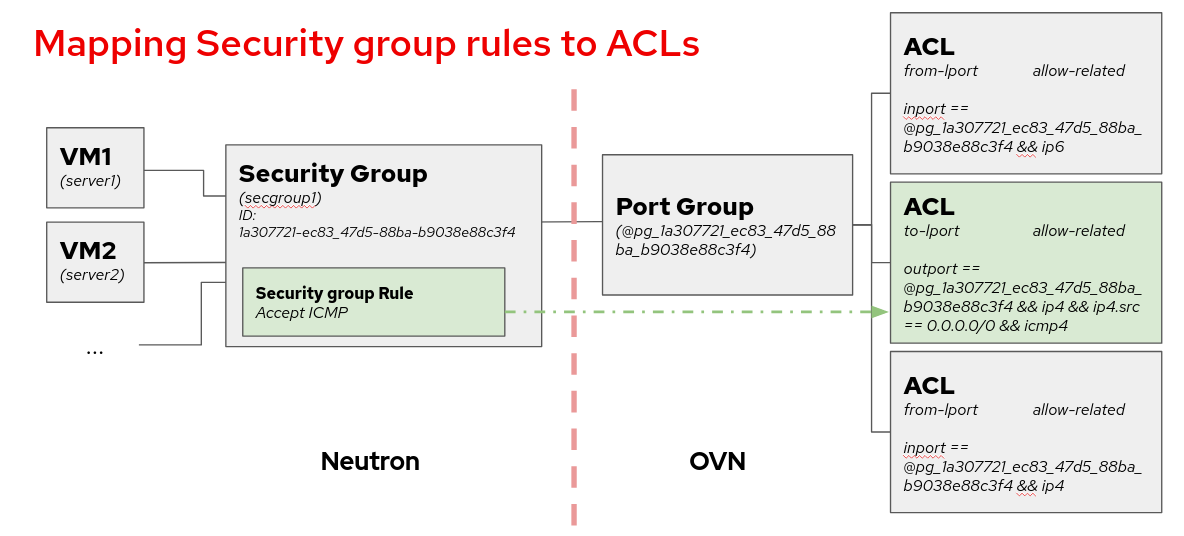
有关此实现的开发细节,您可以查看 贡献者文档。
服务配置
要启用日志服务,请将 log 添加到 /etc/neutron/neutron.conf 中的 service_plugins 设置中
service_plugins = router,metering,log
可以通过修改 /etc/neutron/plugins/ml2/ml2_conf.ini 中 [network_log] 部分中的 rate_limit 和 burst_limit 来调整我们希望如何记录数据包的参数。
rate_limit- 限制发送到 OVN 控制器的日志数据包速率,单位为每秒数据包数。数字越高,日志文件中的日志越多。burst_limit- 在短时间内增加数据包速率限制的指定值。
[network_log]
rate_limit = 150
burst_limit = 50
注意
这些参数具有最小值。对于 rate_limit 来说是 100,对于 burst_limit 来说是 25。
为了使速率和突发量的更改生效,请重新启动 neutron-server 服务。要确保速率和突发量的配置已更新,请检查 OVN Northbound 数据库中的 meter-band 表。您需要创建至少一个日志对象才能看到创建的 meter band 条目。
$ ovn-nbctl list meter-band
服务流程
创建一个以安全组作为资源类型的日志资源
$ openstack network log create --resource-type security_group \
--resource sg1 --event ALL log1

  +-----------------+--------------------------------------+
  | Field           | Value                                |
  +-----------------+--------------------------------------+
  | Description     |                                      |
  | Enabled         | True                                 |
  | Event           | ALL                                  |
  | ID              | 67b1f618-0b89-4b9c-b3e4-9378b4472175 |
  | Name            | log1                                 |
  | Project         | 74731b187a824a8d9b85a12b6eacbcbb     |
  | Resource        | 387494cb-392a-4760-8c36-09be2fdb0b49 |
  | Target          | None                                 |
  | Type            | security_group                       |
  | created_at      | 2023-07-31T09:44:34Z                 |
  | revision_number | 0                                    |
  | tenant_id       | 74731b187a824a8d9b85a12b6eacbcbb     |
  | updated_at      | 2023-07-31T09:44:34Z                 |
  +-----------------+--------------------------------------+
注意
由于 ML2/OVN 驱动的内部设计,存在一个聚合所有丢弃流量的 ACL,而不是每个安全组一个丢弃 ACL。由于 OVN 中最小的日志记录单元是 ACL,这意味着如果我们选择记录 DROP 流量,我们将从所有安全组记录流量。
如果我们选择记录 ALL 流量,我们将获得所选安全组的已接受流量,但所有安全组的丢弃流量。
如果 OVN 中的 ACL 管理被重新设计,这可能会在后续版本中更改。
警告
我们无法在使用 ML2/OVN 时分配单个端口,因此不使用 --target 参数。
就像 ML2/OVS 一样,我们可以在运行时启用或禁用日志对象。如果针对同一资源有两个对象,只要其中一个对象已启用,资源就会在日志文件中被记录。
理解日志记录
在 ML2/OVN 中,我们可以在计算节点的每个 ovn-controller.log 文件中找到数据包监控日志记录。这意味着我们将拥有与计算节点一样多的日志文件,因为每个 OVN 控制器只能记录其管理的流量。OVN 控制器日志的位置可能因发行版而异,请参阅您的安装文档以获取更多详细信息。日志记录的格式是
2023-01-08T17:57:28.283002425+00:00 stderr F
2023-01-08T17:57:28Z|00094|acl_log(ovn_pinctrl0)|INFO|
name="neutron-e9ebf19c-3d84-49ae-a81e-7a01035a8768", verdict=allow,
severity=info, direction=to-lport: icmp, vlan_tci=0x0000,
dl_src=fa:16:3e:d3:b4:48, dl_dst=fa:16:3e:9a:d9:7d, nw_src=10.0.0.67,
nw_dst=192.168.100.11, nw_tos=0, nw_ecn=0, nw_ttl=63, nw_frag=no,
icmp_type=8, icmp_code=0
在此示例中,名称是 neutron-<security group log object ID>。我们还可以看到判决、严重程度、数据报的方向和内容。
ML2/OVS 驱动
支持的可记录资源类型
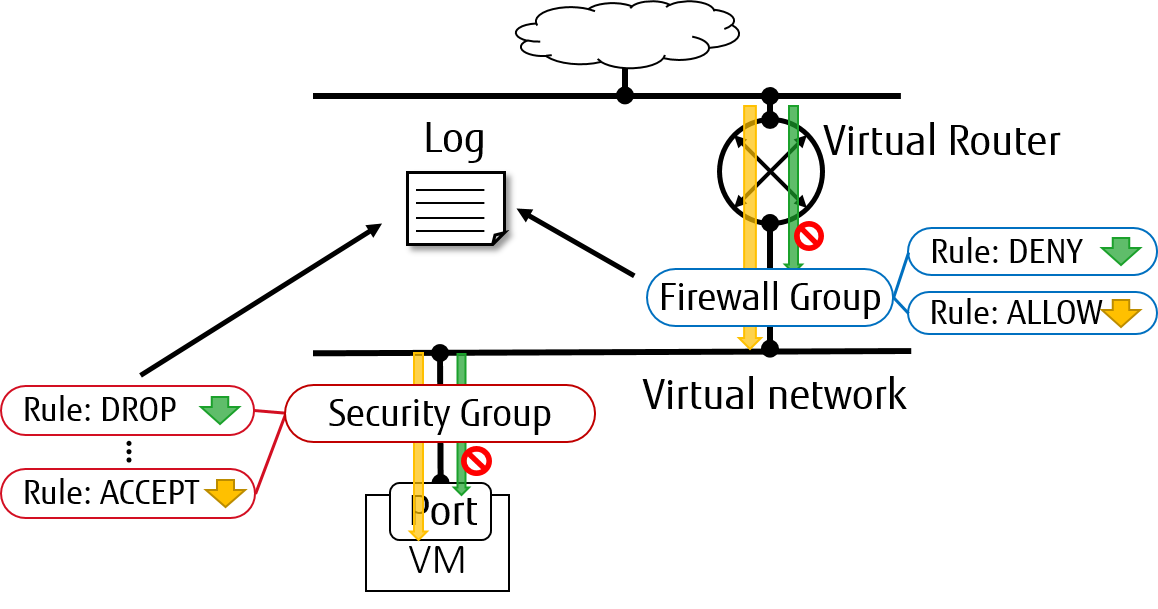
从 Rocky 版本开始,ML2/OVS 驱动支持 security_group 和 firewall_group 作为 Neutron 数据包日志记录框架中的资源类型。
服务配置
要启用日志服务,请按照以下步骤操作。
在 Neutron 控制器节点上,将
log添加到/etc/neutron/neutron.conf文件中的service_plugins设置中。例如service_plugins = router,metering,log
要在第 2 层为
security_group启用日志服务,请将log添加到控制器节点上/etc/neutron/plugins/ml2/ml2_conf.ini中的extensions选项中,以及计算/网络节点上的/etc/neutron/plugins/ml2/openvswitch_agent.ini中。例如[agent] extensions = log
注意
Fwaas v2 日志目前仅受 openvswitch 支持。
要在第 3 层为
firewall_group启用日志服务,请将fwaas_v2_log添加到网络节点上/etc/neutron/l3_agent.ini中[AGENT]部分中的extensions选项中。例如[AGENT] extensions = fwaas_v2,fwaas_v2_log
在计算/网络节点上,将配置添加到
/etc/neutron/plugins/ml2/openvswitch_agent.ini和/etc/neutron/l3_agent.ini中的[network_log]中,如下所示[network_log] rate_limit = 100 burst_limit = 25 #local_output_log_base = <None>
其中,
rate_limit用于配置每秒记录的最大数据包数(每秒数据包数)。当高速率触发rate_limit时,日志会排队等待记录数据包。burst_limit用于配置排队数据包的最大数量。并且可以使用local_output_log_base将记录的数据包存储在任何位置。注意
对于
rate_limit来说至少需要100,对于burst_limit来说至少需要25。如果未设置
rate_limit,日志将记录无限量。如果我们没有指定
local_output_log_base,记录的数据包将默认存储在系统日志中,例如/var/log/syslog。
受信任项目 policy.yaml 配置
使用默认的 /etc/neutron/policy.yaml,管理员必须代表云项目设置资源日志记录。
如果项目被信任以管理其云中的可记录资源,则可以修改 Neutron 的策略文件 policy.yaml 以允许这样做。
修改 /etc/neutron/policy.yaml 条目如下
"get_loggable_resources": "rule:regular_user"
"create_log": "rule:regular_user"
"get_log": "rule:regular_user"
"get_logs": "rule:regular_user"
"update_log": "rule:regular_user"
"delete_log": "rule:regular_user"
运营商服务流程
要检查框架支持的可记录资源
$ openstack network loggable resources list
+-----------------+
| Supported types |
+-----------------+
| security_group  |
| firewall_group  |
+-----------------+
注意
在 VM 端口中,
security_group的日志记录当前适用于openvswitch防火墙驱动程序。防火墙组的日志记录仅适用于内部路由器端口。VM 端口将在未来支持。
日志创建
使用适当的资源类型创建一个日志资源
$ openstack network log create --resource-type security_group \
  --description "Collecting all security events" \
  --event ALL Log_Created
+-----------------+------------------------------------------------+
| Field           | Value                                          |
+-----------------+------------------------------------------------+
| Description     | Collecting all security events                 |
| Enabled         | True                                           |
| Event           | ALL                                            |
| ID              | 8085c3e6-0fa2-4954-b5ce-ff6207931b6d           |
| Name            | Log_Created                                    |
| Project         | 02568bd62b414221956f15dbe9527d16               |
| Resource        | None                                           |
| Target          | None                                           |
| Type            | security_group                                 |
| created_at      | 2017-07-05T02:56:43Z                           |
| revision_number | 0                                              |
| tenant_id       | 02568bd62b414221956f15dbe9527d16               |
| updated_at      | 2017-07-05T02:56:43Z                           |
+-----------------+------------------------------------------------+
警告
在请求中未指定
--resource和--target的情况下,这些参数将默认分配给ALL。因此,将创建大量的日志事件。使用给定的资源(sg1 或 fwg1)创建日志资源
$ openstack network log create my-log --resource-type security_group --resource sg1
$ openstack network log create my-log --resource-type firewall_group --resource fwg1
使用给定的目标(portA)创建日志资源
$ openstack network log create my-log --resource-type security_group --target portA
仅为给定的目标(portB)和给定的资源(sg1 或 fwg1)创建日志资源
$ openstack network log create my-log --resource-type security_group --target portB --resource sg1
$ openstack network log create my-log --resource-type firewall_group --target portB --resource fwg1
注意
默认情况下,
Enabled字段设置为True。如果启用,记录的事件将被写入目标(如果配置了local_output_log_base)或默认情况下写入/var/log/syslog。如果日志创建请求中未指定
--event,则Event字段将被设置为ALL。
启用/禁用日志
我们可以在运行时
enable或disable日志对象。这意味着它将立即应用于与日志对象注册的所有端口。例如$ openstack network log set --disable Log_Created $ openstack network log show Log_Created +-----------------+------------------------------------------------+ | Field | Value | +-----------------+------------------------------------------------+ | Description | Collecting all security events | | Enabled | False | | Event | ALL | | ID | 8085c3e6-0fa2-4954-b5ce-ff6207931b6d | | Name | Log_Created | | Project | 02568bd62b414221956f15dbe9527d16 | | Resource | None | | Target | None | | Type | security_group | | created_at | 2017-07-05T02:56:43Z | | revision_number | 1 | | tenant_id | 02568bd62b414221956f15dbe9527d16 | | updated_at | 2017-07-05T03:12:01Z | +-----------------+------------------------------------------------+
记录事件描述
当前,数据包日志记录框架支持收集与注册资源相关的 ACCEPT 或 DROP 或两者事件。如上所述,Neutron 数据包日志记录框架通过 log 服务插件提供两种可记录资源:security_group 和 firewall_group。
每个事件的一般特征如下所示
记录每个
DROP事件:每当传入或传出会话被安全组或防火墙组阻止时,都会生成每个DROP安全事件记录
ACCEPT事件:只有对于允许的安全组或防火墙组的每个NEW传入或传出会话,才会生成ACCEPT安全事件。有关ACCEPT事件的更多详细信息如下所示北/南
ACCEPT:对于北/南会话,无论方向如何,都只有一个ACCEPT事件。东西/东西
ACCEPT/ACCEPT:在允许源端口和目标端口的机内东西会话中,即流量被允许,将生成两个ACCEPT安全事件,一个来自源端口的视角,一个来自目标端口的视角。东西/东西
ACCEPT/DROP:在机内东西会话启动时,源端口允许会话,而目标端口不允许会话,将生成来自源端口视角的ACCEPT安全事件,以及来自目标端口视角的DROP安全事件。
安全组收集的安全事件应包括
流的时间戳。
流的状态
ACCEPT/DROP。流量的发起者的指示,例如哪个项目或日志资源生成了事件。
关联实例接口的标识符(neutron 端口 ID)。
第 2 层、第 3 层和第 4 层信息(mac、地址、端口、协议等)。
安全事件记录格式
记录的
ACCEPT事件的数据如下所示May 5 09:05:07 action=ACCEPT project_id=736672c700cd43e1bd321aeaf940365c log_resource_ids=['4522efdf-8d44-4e19-b237-64cafc49469b', '42332d89-df42-4588-a2bb-3ce50829ac51'] vm_port=e0259ade-86de-482e-a717-f58258f7173f ethernet(dst='fa:16:3e:ec:36:32',ethertype=2048,src='fa:16:3e:50:aa:b5'), ipv4(csum=62071,dst='10.0.0.4',flags=2,header_length=5,identification=36638,offset=0, option=None,proto=6,src='172.24.4.10',tos=0,total_length=60,ttl=63,version=4), tcp(ack=0,bits=2,csum=15097,dst_port=80,offset=10,option=[TCPOptionMaximumSegmentSize(kind=2,length=4,max_seg_size=1460), TCPOptionSACKPermitted(kind=4,length=2), TCPOptionTimestamps(kind=8,length=10,ts_ecr=0,ts_val=196418896), TCPOptionNoOperation(kind=1,length=1), TCPOptionWindowScale(kind=3,length=3,shift_cnt=3)], seq=3284890090,src_port=47825,urgent=0,window_size=14600)
记录的
DROP事件的数据May 5 09:05:07 action=DROP project_id=736672c700cd43e1bd321aeaf940365c log_resource_ids=['4522efdf-8d44-4e19-b237-64cafc49469b'] vm_port=e0259ade-86de-482e-a717-f58258f7173f ethernet(dst='fa:16:3e:ec:36:32',ethertype=2048,src='fa:16:3e:50:aa:b5'), ipv4(csum=62071,dst='10.0.0.4',flags=2,header_length=5,identification=36638,offset=0, option=None,proto=6,src='172.24.4.10',tos=0,total_length=60,ttl=63,version=4), tcp(ack=0,bits=2,csum=15097,dst_port=80,offset=10,option=[TCPOptionMaximumSegmentSize(kind=2,length=4,max_seg_size=1460), TCPOptionSACKPermitted(kind=4,length=2), TCPOptionTimestamps(kind=8,length=10,ts_ecr=0,ts_val=196418896), TCPOptionNoOperation(kind=1,length=1), TCPOptionWindowScale(kind=3,length=3,shift_cnt=3)], seq=3284890090,src_port=47825,urgent=0,window_size=14600)
防火墙组收集的事件应包括
流的时间戳。
流的状态
ACCEPT/DROP。正在收集此事件的日志对象的标识符
关联实例接口的标识符(neutron 端口 ID)。
第 2 层、第 3 层和第 4 层信息(mac、地址、端口、协议等)。
安全事件记录格式
记录的
ACCEPT事件的数据如下所示Jul 26 14:46:20: action=ACCEPT, log_resource_ids=[u'2e030f3a-e93d-4a76-bc60-1d11c0f6561b'], port=9882c485-b808-4a34-a3fb-b537642c66b2 pkt=ethernet(dst='fa:16:3e:8f:47:c5',ethertype=2048,src='fa:16:3e:1b:3e:67') ipv4(csum=47423,dst='10.10.1.16',flags=2,header_length=5,identification=27969,offset=0,option=None,proto=1,src='10.10.0.5',tos=0,total_length=84,ttl=63,version=4) icmp(code=0,csum=41376,data=echo(data='\xe5\xf2\xfej\x00\x00\x00\x00\x00\x00\x00\x00\x00\x00\x00\x00\x00\x00\x00\x00 \x00\x00\x00\x00\x00\x00\x00\x00\x00\x00\x00\x00\x00\x00\x00\x00\x00\x00\x00\x00\x00\x00\x00\x00\x00\x00\x00\x00\x00 \x00\x00\x00\x00\x00\x00\x00',id=29185,seq=0),type=8)
记录的
DROP事件的数据Jul 26 14:51:20: action=DROP, log_resource_ids=[u'2e030f3a-e93d-4a76-bc60-1d11c0f6561b'], port=9882c485-b808-4a34-a3fb-b537642c66b2 pkt=ethernet(dst='fa:16:3e:32:7d:ff',ethertype=2048,src='fa:16:3e:28:83:51') ipv4(csum=17518,dst='10.10.0.5',flags=2,header_length=5,identification=57874,offset=0,option=None,proto=1,src='10.10.1.16',tos=0,total_length=84,ttl=63,version=4) icmp(code=0,csum=23772,data=echo(data='\x8a\xa0\xac|\x00\x00\x00\x00\x00\x00\x00\x00\x00\x00\x00\x00\x00\x00\x00\x00 \x00\x00\x00\x00\x00\x00\x00\x00\x00\x00\x00\x00\x00\x00\x00\x00\x00\x00\x00\x00\x00\x00\x00\x00\x00\x00\x00\x00\x00 \x00\x00\x00\x00\x00\x00\x00',id=25601,seq=5),type=8)
注意
安全事件日志中不生成其他无关事件,例如调试数据等。
