ETSI NFV-SOL CNF 自动伸缩,通过 PM 阈值接口与 Prometheus
本文档描述了如何在 Tacker v2 API 中通过性能管理阈值接口,使用 Prometheus 实现 CNF 的自动伸缩。
注意
本文档的内容已确认在使用 Prometheus 2.45 和 Alertmanager 0.26 时有效。
概述
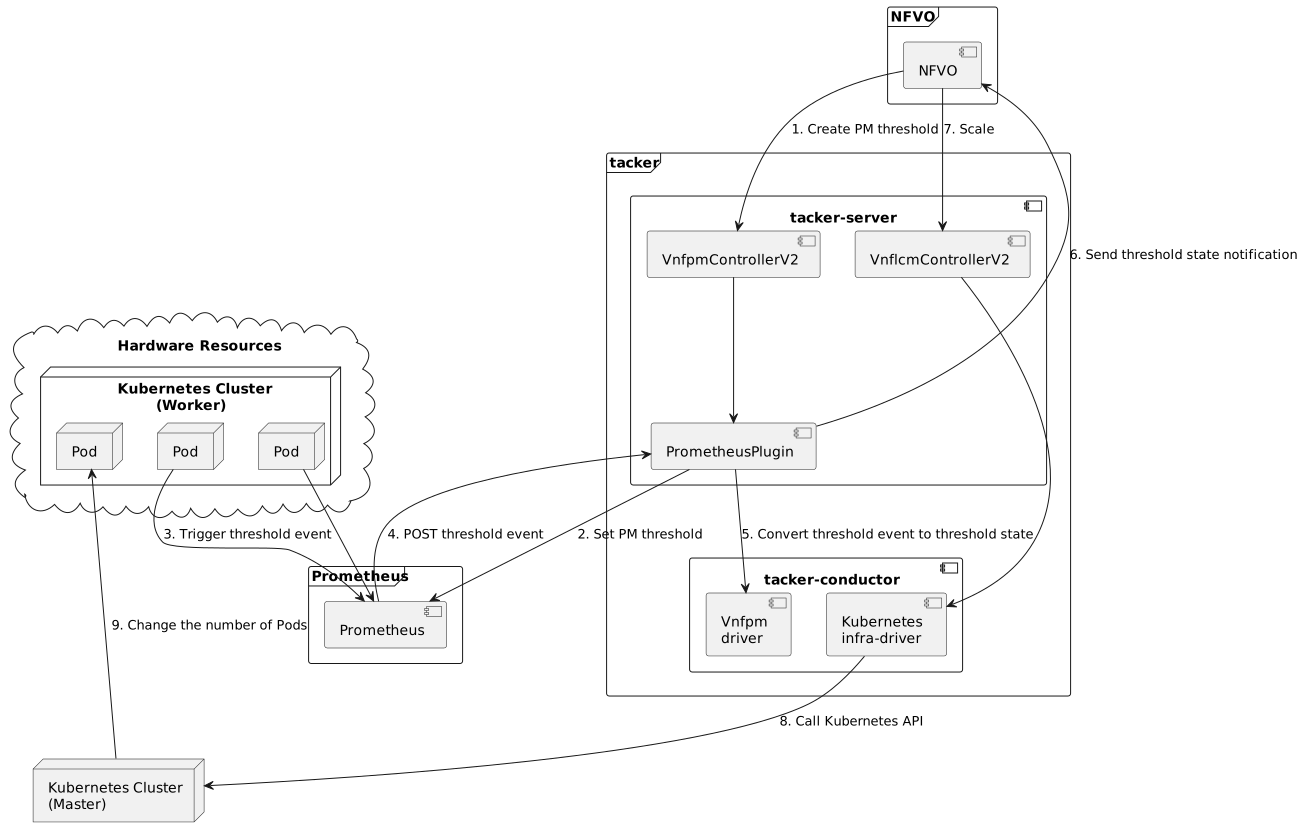
下图显示了 CNF 自动伸缩的概述。
创建 PM 阈值
NFVO 向 Tacker 发送请求以创建 PM 阈值。
设置 PM 阈值
Prometheus 插件将 PM 阈值设置为 Prometheus。
触发阈值事件
Prometheus 收集指标并决定是否需要触发阈值事件。
POST 阈值事件
Prometheus 向 Tacker 发送带有指定 URI 的 POST 请求。Tacker 收集与 PM 阈值事件相关的数据。
将阈值事件转换为阈值状态
Tacker 接收到通知的阈值事件,将其转换为阈值状态,并将其保存到数据库。
发送阈值状态通知
VnfPmDriverV2 在数据库中找到所有阈值,并将阈值状态与阈值匹配。如果阈值状态的 crossingDirection 为
UP或DOWN,则将通知发送到 NFVO 的指定路径。如果匹配不成功或情况不存在,则处理结束。规模
收到来自 NFVO 的 VNF 伸缩请求后,tacker-server 会将其重定向到 tacker-conductor。
调用 Kubernetes API
在 tacker-conductor 中,请求会根据实例化参数的内容再次重定向到适当的基础设施驱动程序(在本例中为 Kubernetes 基础设施驱动程序)。然后,Kubernetes 基础设施驱动程序调用 Kubernetes API。
更改 Pod 的数量
Kubernetes Master 根据 API 调用更改 Pod 的数量。
先决条件
应安装以下软件包
tacker
python-tackerclient
至少需要一个状态为
INSTANTIATED的 VNF 实例。有关实例化 VNF 的过程,请参阅 ETSI NFV-SOL CNF(容器化 VNF)部署。使用的 VNF 包可以参考 示例。
应安装以下第三方服务
NFVO
Prometheus(包括 Alertmanager)
每个运营商都有自己的 NFVO,这里没有限制,只要符合 ETSI NFV-SOL 002 v3.3.1 和 ETSI NFV-SOL 003 v3.3.1,就可以使用。
有关 Prometheus 和 Alertmanager 的安装,请参考 官方网站。
如何配置 Prometheus 插件
请参考 如何 配置 Prometheus 插件 在 ETSI NFV-SOL CNF 自动伸缩,通过 PM Job 接口与 Prometheus 中启用 Prometheus 插件。
如何创建 PM 阈值
在拥有可以伸缩的 CNF 后,我们需要创建 PM 阈值。它确定 Prometheus 使用的监控指标和监控资源。
注意
在拥有 NFVO 客户端时,请求由 NFVO 发送。
创建 PM 阈值的接口在 ETSI NFV-SOL 002 v3.3.1 和 ETSI NFV-SOL 003 v3.3.1 中定义。
此接口所需的参数如下。
属性名称 |
数据类型 |
基数 |
描述 |
|---|---|---|---|
objectType |
字符串 |
1 |
被测量对象的类型。测量适用的被测量对象类型在 ETSI GS NFV-IFA 027 的 7.2 条中定义。 |
objectInstanceId |
标识符 |
1 |
请求收集性能信息的被测对象实例的标识符。 |
subObjectInstanceIds |
IdentifierInVnf |
0..N |
对于结构化的被测对象,被测对象实例的标识符。 |
criteria |
ThresholdCriteria |
1 |
性能信息收集的标准。 |
performanceMetric |
字符串 |
1 |
这定义了指定对象实例的性能指标类型。有效值在 ETSI GS NFV-IFA 027 的 7.2 条中指定为“Measurement Name”值。 |
thresholdType |
字符串 |
1 |
这定义了阈值的类型。此属性确定数据结构中存在哪些其他属性。 |
simpleThresholdDetails |
结构 |
0..1 |
简单阈值的详细信息。如果 thresholdType=”SIMPLE”,则必须存在。 |
thresholdValue |
Float |
1 |
阈值。必须表示为浮点数。 |
hysteresis |
Float |
1 |
阈值的滞后。必须表示为非负浮点数。 |
callbackUri |
Uri |
1 |
发送通知的端点的 URI。 |
authentication |
SubscriptionAuthentication |
0..1 |
用于配置发送与此订阅对应的授权的身份验证参数。请参阅 ETSI GS NFV-SOL 013 的 8.3.4 条。 |
metadata |
结构 |
1 |
创建 PM 阈值的附加参数。 |
监控 |
结构 |
1 |
处理诸如监控系统和驱动程序信息等内容。 |
monitorName |
字符串 |
1 |
如果指定“prometheus”,则监控功能的后端将是 Prometheus。 |
driverType |
字符串 |
1 |
“external”: SCP/SFTP 用于配置文件传输。 |
targetsInfo |
结构 |
1..N |
有关目标监控系统的信息。 |
prometheusHost |
字符串 |
1 |
目标 PrometheusServer 的 FQDN 或 IP 地址。 |
prometheusHostPort |
Int |
1 |
目标 PrometheusServer 的 ssh 端口。 |
alertRuleConfigPath |
字符串 |
1 |
目标 Prometheus 的 alertRuleConfig 路径。 |
prometheusReloadApiEndpoint |
字符串 |
1 |
目标 Prometheus 的重新加载 API 的端点 URL。 |
authInfo |
结构 |
1 |
定义访问主机的身份验证信息。 |
ssh_username |
字符串 |
1 |
目标主机用于 ssh 的用户名。 |
ssh_password |
字符串 |
1 |
目标主机用于 ssh 的密码。 |
注意
objectType只有以下值:Vnf、Vnfc、VnfIntCp、VnfExtCp。
可以通过以下 CLI 命令创建 PM 阈值。
$ openstack vnfpm threshold create sample_param_file.json --os-tacker-api-version 2
本文档中示例 sample_param_file.json 的内容如下
{
    "objectType": "Vnf",
    "objectInstanceId": "c21fd71b-2866-45f6-89d0-70c458a5c32e",
    "criteria": {
        "performanceMetric": "VCpuUsageMeanVnf.c21fd71b-2866-45f6-89d0-70c458a5c32e",
        "thresholdType": "SIMPLE",
        "simpleThresholdDetails": {
            "thresholdValue": 1,
            "hysteresis": 0.5
        }
    },
    "callbackUri": "http://127.0.0.1:9990/notification/callbackuri/c21fd71b-2866-45f6-89d0-70c458a5c32e",
    "metadata": {
        "monitoring": {
            "monitorName": "prometheus",
            "driverType": "external",
            "targetsInfo": [
                {
                    "prometheusHost": "192.168.121.35",
                    "prometheusHostPort": 22,
                    "authInfo": {
                        "ssh_username": "vagrant",
                        "ssh_password": "vagrant"
                    },
                    "alertRuleConfigPath":
                        "/etc/prometheus/rules",
                    "prometheusReloadApiEndpoint":
                        "http://192.168.121.35:9090/-/reload"
                }
            ]
        }
    }
}
注意
Tacker 通过向 /-/reload 端点发送 HTTP POST 请求来重新加载 Prometheus 配置。因此,Prometheus 需要启用 --web.enable-lifecycle 标志。有关详细信息,请参阅 Prometheus CONFIGURATION。
这是一个创建 PM 阈值的示例
$ openstack vnfpm threshold create sample_param_file.json --os-tacker-api-version 2
+-------------------------+------------------------------------------------------------------------------------------------------+
| Field                   | Value                                                                                                |
+-------------------------+------------------------------------------------------------------------------------------------------+
| Callback Uri            | http://127.0.0.1:9990/notification/callbackuri/c21fd71b-2866-45f6-89d0-70c458a5c32e                  |
| Criteria                | {                                                                                                    |
|                         |     "performanceMetric": "VCpuUsageMeanVnf.c21fd71b-2866-45f6-89d0-70c458a5c32e",                    |
|                         |     "thresholdType": "SIMPLE",                                                                       |
|                         |     "simpleThresholdDetails": {                                                                      |
|                         |         "thresholdValue": 1.0,                                                                       |
|                         |         "hysteresis": 0.5                                                                            |
|                         |     }                                                                                                |
|                         | }                                                                                                    |
| ID                      | 135db472-4f7b-4d55-abaf-27a3ab4d7ba1                                                                 |
| Links                   | {                                                                                                    |
|                         |     "self": {                                                                                        |
|                         |         "href": "http://127.0.0.1:9890/vnfpm/v2/thresholds/135db472-4f7b-4d55-abaf-27a3ab4d7ba1"     |
|                         |     },                                                                                               |
|                         |     "object": {                                                                                      |
|                         |         "href": "http://127.0.0.1:9890/vnflcm/v2/vnf_instances/c21fd71b-2866-45f6-89d0-70c458a5c32e" |
|                         |     }                                                                                                |
|                         | }                                                                                                    |
| Object Instance Id      | c21fd71b-2866-45f6-89d0-70c458a5c32e                                                                 |
| Object Type             | Vnf                                                                                                  |
| Sub Object Instance Ids |                                                                                                      |
+-------------------------+------------------------------------------------------------------------------------------------------+
创建 PM 阈值时,Tacker 将根据 metadata 修改指定的 Prometheus 上的配置文件。然后 Prometheus 将监控指定的资源并将监控信息发送到 Tacker。
以下是 Prometheus 发送信息的请求体的示例
{
    "receiver": "receiver",
    "status": "firing",
    "alerts": [
        {
            "status": "firing",
            "labels": {
                "receiver_type": "tacker",
                "function_type": "vnfpm_threshold",
                "threshold_id": "135db472-4f7b-4d55-abaf-27a3ab4d7ba1",
                "metric": "VCpuUsageMeanVnf.c21fd71b-2866-45f6-89d0-70c458a5c32e",
                "object_instance_id": "c21fd71b-2866-45f6-89d0-70c458a5c32e"
            },
            "annotations": {
                "value": 99
            },
            "startsAt": "2022-12-15T23:47:36.453Z",
            "endsAt": "0001-01-01T00:00:00Z",
            "generatorURL": "http://192.168.121.35:9090/graph?g0.expr=up%7Bjob%3D%22node%22%7D+%3D%3D+0&g0.tab=1",
            "fingerprint": "5ef77f1f8a3ecb8d"
        }
    ],
    "groupLabels": {},
    "commonLabels": {
        "alertname": "NodeInstanceDown",
        "job": "node"
    },
    "commonAnnotations": {
        "description": "sample"
    },
    "externalURL": "http://192.168.121.35:9093",
    "version": "4",
    "groupKey": "{}:{}",
    "truncatedAlerts": 0
}
Tacker 将接收到的监控信息转换为阈值状态,并向 NFVO 发送通知请求。
以下是示例通知请求的主体。
{
    "id": "0aa6500e-cdee-41f7-aadd-af80f7622ebc",
    "notificationType": "ThresholdCrossedNotification",
    "timeStamp": "2023-12-06T09:08:06Z",
    "thresholdId": "135db472-4f7b-4d55-abaf-27a3ab4d7ba1",
    "crossingDirection": "DOWN",
    "objectType": "Vnf",
    "objectInstanceId": "c21fd71b-2866-45f6-89d0-70c458a5c32e",
    "performanceMetric": "VCpuUsageMeanVnf.c21fd71b-2866-45f6-89d0-70c458a5c32e",
    "performanceValue": "0.0004428400000000465",
    "_links": {
        "objectInstance": {
            "href": "http://127.0.0.1:9890/vnflcm/v2/vnf_instances/c21fd71b-2866-45f6-89d0-70c458a5c32e"
        },
        "threshold": {
            "href": "http://127.0.0.1:9890/vnfpm/v2/thresholds/135db472-4f7b-4d55-abaf-27a3ab4d7ba1"
        }
    }
}
注意
此通知请求的目标 URL 是 PM 阈值中的 Callback Uri 字段。
NFVO 如何自动伸缩 CNF
NFVO 将根据通知数据确定是否需要伸缩操作。如果需要,将向 Tacker 发送伸缩请求。
如何使用 PM 接口的 CLI
创建 PM 阈值
PM 阈值的创建已经在 如何创建 PM 阈值 中介绍,CLI 命令的使用案例可以在那里参考。
获取所有 PM 阈值
可以通过以下 CLI 命令获取所有 PM 阈值。
$ openstack vnfpm threshold list --os-tacker-api-version 2
这是一个获取所有 PM 阈值的示例
$ openstack vnfpm threshold list --os-tacker-api-version 2
+--------------------------------------+-------------+------------------------------------------------------------------------------------------------------+
| ID                                   | Object Type | Links                                                                                                |
+--------------------------------------+-------------+------------------------------------------------------------------------------------------------------+
| 135db472-4f7b-4d55-abaf-27a3ab4d7ba1 | Vnf         | {                                                                                                    |
|                                      |             |     "self": {                                                                                        |
|                                      |             |         "href": "http://127.0.0.1:9890/vnfpm/v2/thresholds/135db472-4f7b-4d55-abaf-27a3ab4d7ba1"     |
|                                      |             |     },                                                                                               |
|                                      |             |     "object": {                                                                                      |
|                                      |             |         "href": "http://127.0.0.1:9890/vnflcm/v2/vnf_instances/c21fd71b-2866-45f6-89d0-70c458a5c32e" |
|                                      |             |     }                                                                                                |
|                                      |             | }                                                                                                    |
+--------------------------------------+-------------+------------------------------------------------------------------------------------------------------+
获取指定的 PM 阈值
可以通过以下 CLI 命令获取指定的 PM 阈值。
$ openstack vnfpm threshold show THRESHOLD_ID --os-tacker-api-version 2
这是一个获取指定 PM 阈值的示例
$ openstack vnfpm threshold show 135db472-4f7b-4d55-abaf-27a3ab4d7ba1 --os-tacker-api-version 2
+-------------------------+------------------------------------------------------------------------------------------------------+
| Field                   | Value                                                                                                |
+-------------------------+------------------------------------------------------------------------------------------------------+
| Callback Uri            | http://127.0.0.1:9990/notification/callbackuri/c21fd71b-2866-45f6-89d0-70c458a5c32e                  |
| Criteria                | {                                                                                                    |
|                         |     "performanceMetric": "VCpuUsageMeanVnf.c21fd71b-2866-45f6-89d0-70c458a5c32e",                    |
|                         |     "thresholdType": "SIMPLE",                                                                       |
|                         |     "simpleThresholdDetails": {                                                                      |
|                         |         "thresholdValue": 1.0,                                                                       |
|                         |         "hysteresis": 0.5                                                                            |
|                         |     }                                                                                                |
|                         | }                                                                                                    |
| ID                      | 135db472-4f7b-4d55-abaf-27a3ab4d7ba1                                                                 |
| Links                   | {                                                                                                    |
|                         |     "self": {                                                                                        |
|                         |         "href": "http://127.0.0.1:9890/vnfpm/v2/thresholds/135db472-4f7b-4d55-abaf-27a3ab4d7ba1"     |
|                         |     },                                                                                               |
|                         |     "object": {                                                                                      |
|                         |         "href": "http://127.0.0.1:9890/vnflcm/v2/vnf_instances/c21fd71b-2866-45f6-89d0-70c458a5c32e" |
|                         |     }                                                                                                |
|                         | }                                                                                                    |
| Object Instance Id      | c21fd71b-2866-45f6-89d0-70c458a5c32e                                                                 |
| Object Type             | Vnf                                                                                                  |
| Sub Object Instance Ids |                                                                                                      |
+-------------------------+------------------------------------------------------------------------------------------------------+
更改目标 PM 阈值
更新 PM 阈值只能更改两个字段,callbackUri 和 authentication。可以通过以下 CLI 命令执行。
$ openstack vnfpm threshold update THRESHOLD_ID sample_param_file.json --os-tacker-api-version 2
本文档中示例 sample_param_file.json 的内容如下
{
    "callbackUri": "http://127.0.0.1:9990/notification/callbackuri/c21fd71b-2866-45f6-89d0-70c458a5c32e-update"
}
这是一个更改目标 PM 阈值的示例
$ openstack vnfpm threshold update 135db472-4f7b-4d55-abaf-27a3ab4d7ba1 sample_param_file.json --os-tacker-api-version 2
+--------------+--------------------------------------------------------------------------------------------+
| Field        | Value                                                                                      |
+--------------+--------------------------------------------------------------------------------------------+
| Callback Uri | http://127.0.0.1:9990/notification/callbackuri/c21fd71b-2866-45f6-89d0-70c458a5c32e-update |
+--------------+--------------------------------------------------------------------------------------------+
删除指定的 PM 阈值
可以通过以下 CLI 命令删除指定的 PM 阈值。
$ openstack vnfpm threshold delete THRESHOLD_ID --os-tacker-api-version 2
这是一个删除指定 PM 阈值的示例
$ openstack vnfpm threshold delete 135db472-4f7b-4d55-abaf-27a3ab4d7ba1 --os-tacker-api-version 2
VNF PM threshold '135db472-4f7b-4d55-abaf-27a3ab4d7ba1' deleted successfully
