安装 vexxhost magnum-cluster-api 驱动
关于此仓库
此仓库包含用于部署 OpenStack Magnum 服务 Vexxhost magnum-cluster-api 驱动的 playbook 和 role。
这些 playbook 创建一个完整的部署,包括控制平面 k8s 集群,应该为操作员提供开箱即用的体验。
以下架构特性存在
控制平面 k8s 集群是 openstack-ansible 部署不可分割的一部分,并与 mariadb 和 rabbitmq 一起构成基础组件。
控制平面 k8s 集群部署在 infra 主机上,并与 haproxy 负载均衡器和 OpenStack 内部 API 端点集成,未暴露在部署外部
所有组件之间都支持 SSL,并且可以配置以支持内部和外部负载均衡器端点上的不同证书颁发机构。
如果需要,控制平面流量可以完全保留在管理网络内
部署 magnum-cluster-api-proxy 服务以允许控制平面和工作负载集群之间的通信,当工作负载集群未附加浮动 IP 时。
可以进行完全离线安装,用于隔离环境
magnum 的 magnum-cluster-api 驱动程序可以在这里找到 https://github.com/vexxhost/magnum-cluster-api
Vexxhost magnum-cluster-api 驱动程序的文档在这里 https://vexxhost.github.io/magnum-cluster-api/
用于部署控制平面 k8s 集群的 ansible collection 在这里 https://github.com/vexxhost/ansible-collection-kubernetes
用于部署控制平面 k8s 集群的容器运行时使用的 ansible collection 在这里 https://github.com/vexxhost/ansible-collection-containers
这些 playbook 需要 Openstack-Ansible Caracal 或更高版本。
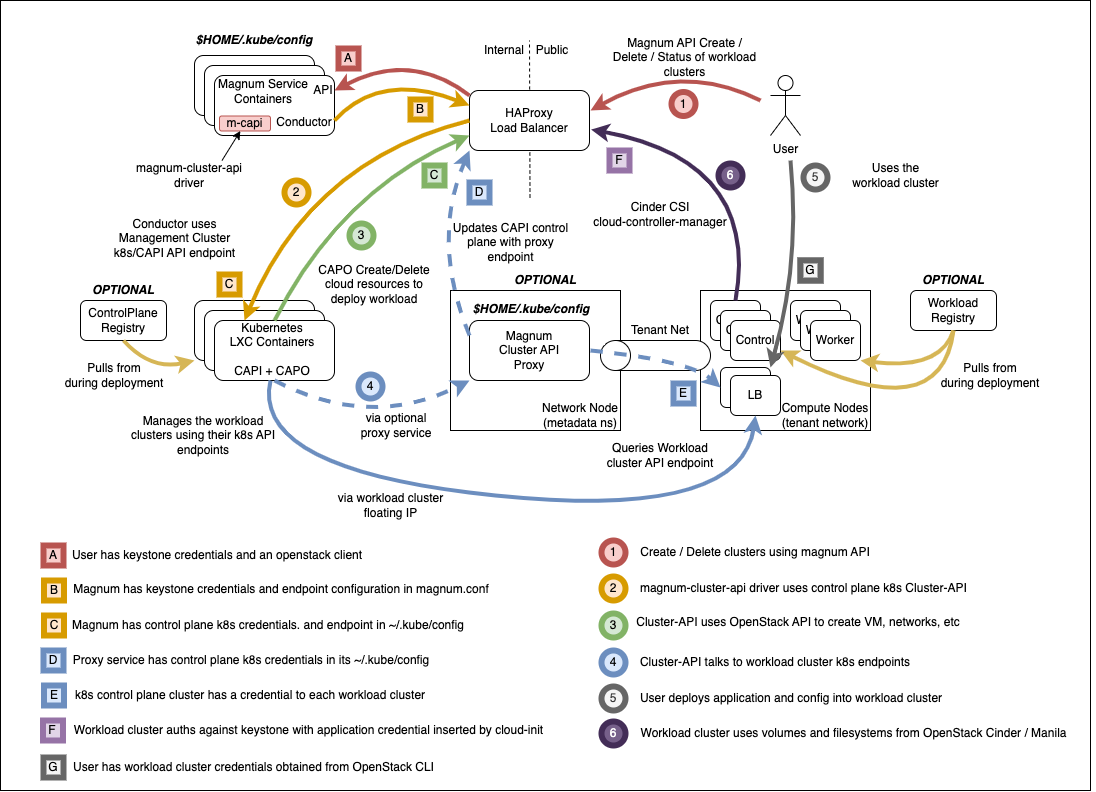
Magnum 基础设施的高级概述,这些 playbook 将构建和运行于其之上。
先决条件
现有的 openstack-ansible 部署
控制平面使用 LXC 容器,裸机部署未经测试
核心 openstack 服务以及 Octavia
OpenStack-Ansible 集成
这些 playbook 以 ansible collection 的形式分发,并通过将 collection 添加到部署主机,与 Openstack-Ansible 集成,方法是在 /etc/openstack_deploy/user-collection-requirements.yml 的 collections 键下添加以下内容。
collections:
  - name: vexxhost.kubernetes
    source: https://github.com/jrosser/ansible-collection-kubernetes
    type: git
    version: venv-support
  - name: osa_ops.mcapi_vexxhost
    type: git
    version: master
    source: https://opendev.org/openstack/openstack-ansible-ops#/mcapi_vexxhost
然后可以使用以下命令安装 collection
cd /opt/openstack-ansible
openstack-ansible scripts/get-ansible-collection-requirements.yml
kubernetes collection 中的模块需要在 ansible-runtime python 虚拟环境中存在额外的 python 模块。在 /etc/openstack_deploy/user-ansible-venv-requirements.txt 中指定此模块
docker-image-py
kubernetes
magnum-cluster-api 驱动程序的 OpenStack-Ansible 配置
在 /etc/openstack_deploy/env.d/k8s.yml 中指定控制平面 k8s 集群的部署
---
component_skel:
  k8s_capi:
    belongs_to:
      - k8s_all

container_skel:
  k8s_container:
    belongs_to:
      - cluster-api_containers
    contains:
      - k8s_capi

physical_skel:
  cluster-api_containers:
    belongs_to:
      - all_containers
  cluster-api_hosts:
    belongs_to:
      - hosts
在 /etc/openstack_deploy/conf.d/k8s.yml 中定义将托管控制平面 k8s 集群的物理主机。此示例适用于一体化部署,如果需要高可用性,应根据实际部署情况进行调整,以匹配多个主机。
cluster-api_hosts:
  aio1:
    ip: 172.29.236.100
在 /etc/openstack_deploy/group_vars/k8s_all/haproxy_service.yml 中将控制平面 k8s 集群与 haproxy 负载均衡器集成
---
# Copyright 2023, BBC R&D
#
# Licensed under the Apache License, Version 2.0 (the "License");
# you may not use this file except in compliance with the License.
# You may obtain a copy of the License at
#
#     https://apache.org/licenses/LICENSE-2.0
#
# Unless required by applicable law or agreed to in writing, software
# distributed under the License is distributed on an "AS IS" BASIS,
# WITHOUT WARRANTIES OR CONDITIONS OF ANY KIND, either express or implied.
# See the License for the specific language governing permissions and
# limitations under the License.

haproxy_k8s_service:
  haproxy_service_name: k8s
  haproxy_backend_nodes: "{{ groups['k8s_all'] | default([]) }}"
  haproxy_ssl: false
  haproxy_ssl_all_vips: false
  haproxy_port: 6443
  haproxy_balance_type: tcp
  haproxy_balance_alg: leastconn
  haproxy_interval: '15000'
  haproxy_backend_port: 6443
  haproxy_backend_rise: 2
  haproxy_backend_fall: 2
  haproxy_timeout_server: '15m'
  haproxy_timeout_client: '5m'
  haproxy_backend_options:
    - tcplog
    - ssl-hello-chk
    - log-health-checks
    - httpchk GET /healthz
  haproxy_backend_httpcheck_options:
    - 'send hdr User-Agent "osa-haproxy-healthcheck" meth GET uri /healthz'
  haproxy_backend_server_options:
    - check-ssl
    - verify none
  haproxy_service_enabled: "{{ groups['k8s_all'] is defined and groups['k8s_all'] | length > 0 }}"

k8s_haproxy_services:
  - "{{ haproxy_k8s_service | combine(haproxy_k8s_service_overrides | default({})) }}"
在 /etc/openstack_deploy/group_vars/k8s_all/main.yml 中配置将托管控制平面 k8s 集群的 LXC 容器,使其适合运行嵌套容器
您还可以设置控制平面 k8s 部署的 config-overrides,将其与 openstack-ansible 部署的其余部分集成。
---
# Run ansible modules in a venv on the target hosts
ansible_collection_kubernetes_target_venv: /opt/mcapi_ansible_venv

# Pick a range of addresses for cilium that do not collide with anything else
cilium_ipv4_cidr: 172.29.200.0/22

# Set a clusterctl version. Supported list can be found in defaults:
# https://github.com/vexxhost/ansible-collection-kubernetes/blob/main/roles/clusterctl/defaults/main.yml
clusterctl_version: 1.8.4
cluster_api_version: 1.8.4
cluster_api_infrastructure_provider: openstack
cluster_api_infrastructure_version: 0.11.2

# wire OSA group, host and network addresses into k8s deployment
kubelet_hostname: "{{ ansible_facts['hostname'] | lower }}"
kubelet_node_ip: "{{ management_address }}"
kubernetes_control_plane_group: k8s_container
kubernetes_hostname: "{{ internal_lb_vip_address }}"
kubernetes_non_init_namespace: true

# Define custom k8s version for the control cluster
# kubernetes_version: 1.31

# Define LXC container overrides
lxc_container_config_list:
  - "lxc.apparmor.profile=unconfined"

lxc_container_mount_auto:
  - "proc:rw"
  - "sys:rw"

# Set this manually, or kube-proxy will try to do this - not possible
# in a non-init namespace and will fail in LXC
openstack_host_nf_conntrack_max: 1572864

# OSA containers dont run ssh by default so cannot use synchronize
upload_helm_chart_method: copy
在 /etc/openstack_deploy/group_vars/magnum_all/main.yml 中设置 magnum 服务的 config-overrides。根据需要调整这里的镜像和 flavor,这些仅用于演示。上传尽可能多的镜像以用于不同的工作负载集群 kubernetes 版本。
必须关注 SSL 配置。用户和工作负载集群将与外部端点交互,并且必须信任 SSL 证书。magnum 服务和 cluster-api 可以配置为与外部或内部端点交互,并且必须信任 SSL 证书。根据环境,这些可能源自不同的证书颁发机构。
---
# Copyright 2020, VEXXHOST, Inc.
#
# Licensed under the Apache License, Version 2.0 (the "License");
# you may not use this file except in compliance with the License.
# You may obtain a copy of the License at
#
#     https://apache.org/licenses/LICENSE-2.0
#
# Unless required by applicable law or agreed to in writing, software
# distributed under the License is distributed on an "AS IS" BASIS,
# WITHOUT WARRANTIES OR CONDITIONS OF ANY KIND, either express or implied.
# See the License for the specific language governing permissions and
# limitations under the License.

magnum_magnum_cluster_api_git_install_branch: v0.24.2
magnum_magnum_cluster_api_git_repo: "{{ openstack_github_base_url | default('https://github.com') ~ '/vexxhost/magnum-cluster-api' }}"

# install magnum-cluster-api and kubernetes python package into magnum venv
magnum_user_pip_packages:
  - "git+{{ magnum_magnum_cluster_api_git_repo }}@{{ magnum_magnum_cluster_api_git_install_branch }}#egg=magnum-cluster-api"
  - kubernetes

# ensure that the internal VIP CA is trusted by the CAPI driver
magnum_config_overrides:
  drivers:
    # Supply a custom CA file which will be passed and used exclusively on all workload nodes
    # System trust will be used by default
    openstack_ca_file: '/usr/local/share/ca-certificates/ExampleCorpRoot.crt'
  capi_client:
    # Supply a CA that will be used exclusively for connections towards
    # OpenStack public and internal endpoints.
    ca_file: '/usr/local/share/ca-certificates/ExampleCorpRoot.crt'
    endpoint: 'internalURL'
  cluster_template:
    kubernetes_allowed_network_drivers: 'calico'
    kubernetes_default_network_driver: 'calico'
  certificates:
    cert_manager_type: x509keypair
  nova_client:
    # ideally magnum would request an appropriate microversion for nova in it's client code
    api_version: '2.15'
运行部署
对于新部署
像往常一样运行 OSA playbooks/setup.yml playbook,遵循正常的部署指南。
运行 magnum-cluster-api 部署
openstack-ansible osa_ops.mcapi_vexxhost.k8s_install
对于现有部署
确保存在 ansible 所需的 python 模块
./scripts/bootstrap-ansible.sh
或者,无需重新运行 bootstrap 脚本
/opt/ansible-runtime/bin/pip install docker-image-py
将 magnum-cluser-api 驱动程序添加到 magnum 服务
openstack-ansible playbooks/os-magnum-install.yml
创建 k8s 控制平面容器
openstack-ansible playbooks/lxc-containers-create.yml --limit k8s_all
运行 magnum-cluster-api 部署
openstack-ansible osa_ops.mcapi_vexxhost.k8s_install
可选地运行 magnum-cluster-api 的功能测试
可以使用以下 playbook 快速完成此操作
openstack-ansible osa_ops.mcapi_vexxhost.functional_test
此 playbook 将创建一个 neutron 公共网络,下载一个预构建的 k8s glance 镜像,创建一个 nova flavor 和一个 magnum 集群模板。
然后它将使用 magnum 部署工作负载 k8s 集群,并运行工作负载集群的 sonobouy “快速模式”测试。
此 playbook 旨在用于 openstack-ansible 一体化部署。
使用 Magnum 创建工作负载集群
上传镜像
创建集群模板
创建工作负载集群
可选组件
magnum-cluster-api-proxy 的使用
由于控制平面 k8s 集群需要访问租户集群的 k8s 控制平面以进行进一步的配置,因此在开箱即用时只能通过公共网络(浮动 IP)来完成此操作。这意味着 k8s 控制平面的 API 必须全局可访问,这会对这些租户集群构成安全威胁。
为了解决此问题并为控制平面 k8s 集群提供访问内部网络中租户集群的权限,引入了一个代理服务。
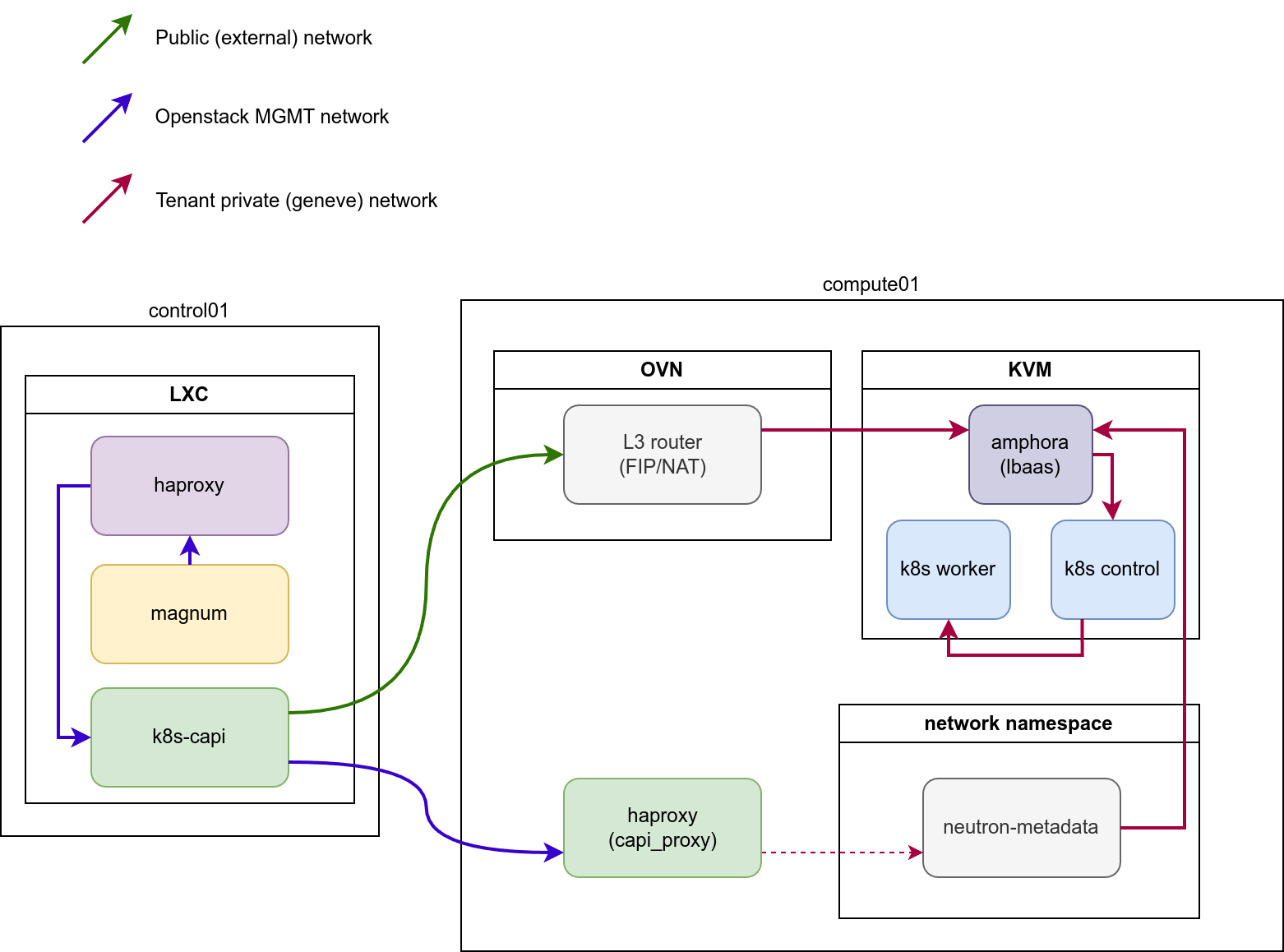
代理服务必须在 Neutron Metadata 代理程序生成的主机上生成。对于 LXB/OVS,这些是 neutron-agent_hosts 的成员,而对于 OVN,该服务应安装到所有 compute_hosts(或 neutron_ovn_controller)上。
该服务将配置自己的 HAProxy 实例,并为托管的 k8s 集群创建后端,以指向相应的网络命名空间内部。服务不会生成自己的命名空间,而是利用现有的元数据命名空间来连接到租户网络内的负载均衡器。
服务的配置相对简单
# Define a group of hosts where to install the service.
# OVN: compute_hosts / neutron_ovn_controller
# OVS/LXB: neutron_metadata_agent
mcapi_vexxhost_proxy_hosts: compute_hosts
# Define address and port HAProxy instance to listen on
mcapi_vexxhost_proxy_environment:
   PROXY_BIND: "{{ management_address }}"
   PROXY_PORT: 44355
此外,在部署代理服务的情况下,请确保为 mcapi_vexxhost_proxy_hosts 定义变量 magnum_magnum_cluster_api_git_install_branch,或者将 magnum_magnum_cluster_api_git_install_branch 的值与 mcapi_vexxhost_proxy_install_branch 对齐,以避免由于使用的驱动程序版本不同而引起的冲突。
配置完成后,您可以运行 playbook
openstack-ansible osa_ops.mcapi_vexxhost.mcapi_proxy
使用本地注册表部署工作负载集群
TODO - 描述如何执行此操作
从本地注册表部署控制平面集群
TODO - 描述如何执行此操作
故障排除
本地测试
配置了 Magnum 和 Octavia 的 OpenStack-Ansible 一体化能够运行功能正常的 magnum-cluster-api 部署。
除了通常需要一体化部署的最低 8G 内存外,还应提供足够的内存。多节点工作负载集群可能需要 nova 启动多个 Ubuntu 镜像,以及 Octavia 负载均衡器实例。64G 将是合适的系统 RAM 量。
此外,/var/lib/nova/instances 中还必须有足够的磁盘空间来支持所需的实例数量 - 通常需要一体化部署的正常最低 60G 将不足,500G 将绰绰有余。
