[ English | Indonesia | русский ]
路由环境示例
本节描述了一个可用的 OpenStack-Ansible (OSA) 部署的生产环境示例,其中具有高可用性服务,提供商网络以及物理机器之间的连接均通过路由(第三层)实现。
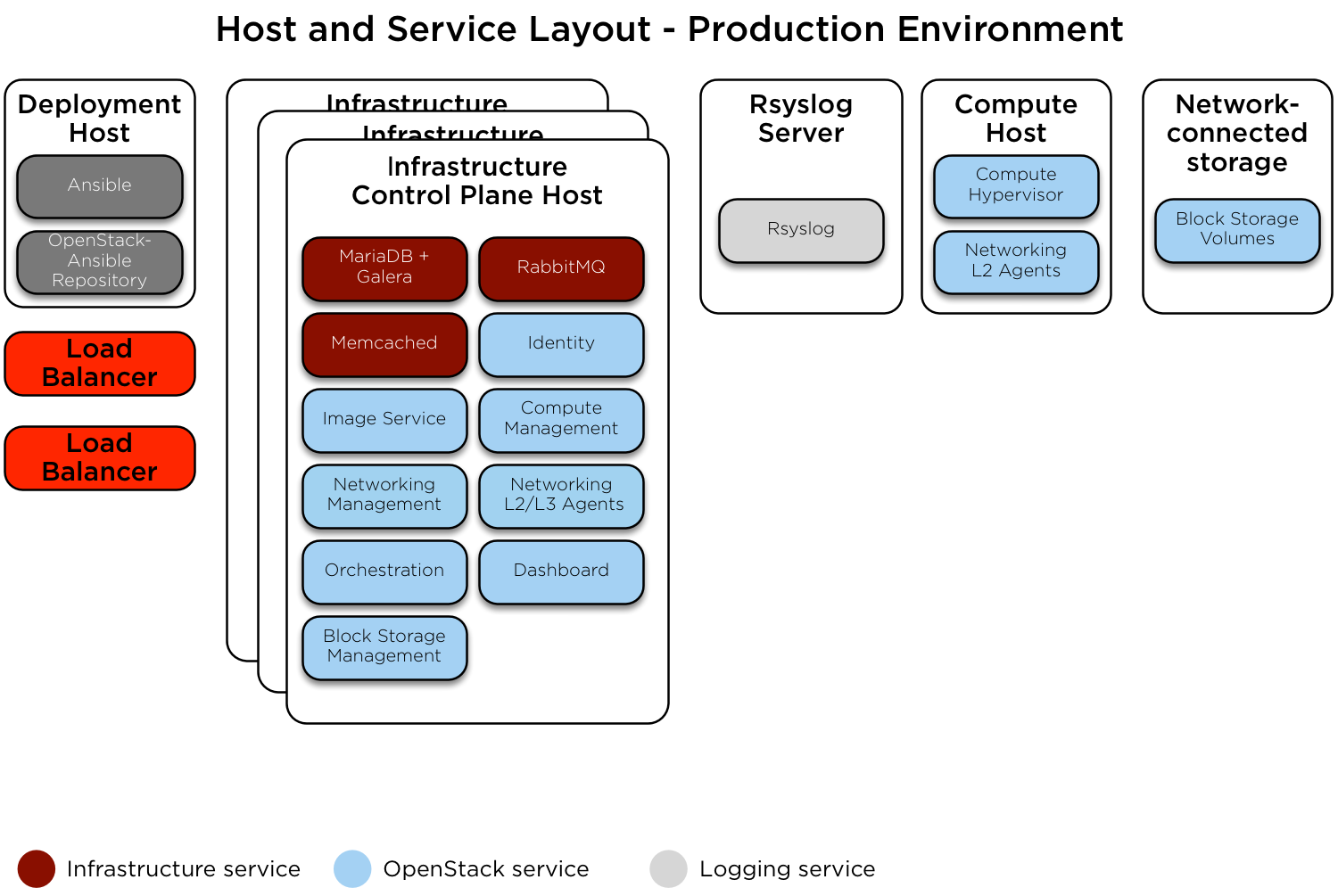
此示例环境具有以下特性
三个基础设施(控制平面)主机
两个计算主机
一个 NFS 存储设备
一个日志聚合主机
每个主机配置了多个网络接口卡 (NIC) 作为绑定对
完整的计算套件,包含遥测服务 (ceilometer),并配置 NFS 作为镜像 (glance) 和块存储 (cinder) 服务的存储后端
添加静态路由以允许每个 pod 的管理、隧道和存储网络之间的通信。网关地址是每个网络子网中的第一个可用地址。
网络配置
网络 CIDR/VLAN 分配
此环境使用以下 CIDR 分配。
网络 |
CIDR |
VLAN |
|---|---|---|
POD 1 管理网络 |
172.29.236.0/24 |
10 |
POD 1 隧道 (VXLAN) 网络 |
172.29.237.0/24 |
30 |
POD 1 存储网络 |
172.29.238.0/24 |
20 |
POD 2 管理网络 |
172.29.239.0/24 |
10 |
POD 2 隧道 (VXLAN) 网络 |
172.29.240.0/24 |
30 |
POD 2 存储网络 |
172.29.241.0/24 |
20 |
POD 3 管理网络 |
172.29.242.0/24 |
10 |
POD 3 隧道 (VXLAN) 网络 |
172.29.243.0/24 |
30 |
POD 3 存储网络 |
172.29.244.0/24 |
20 |
POD 4 管理网络 |
172.29.245.0/24 |
10 |
POD 4 隧道 (VXLAN) 网络 |
172.29.246.0/24 |
30 |
POD 4 存储网络 |
172.29.247.0/24 |
20 |
IP 分配
此环境使用以下主机名和 IP 地址分配。
主机名 |
管理 IP |
隧道 (VXLAN) IP |
存储 IP |
|---|---|---|---|
lb_vip_address |
172.29.236.9 |
||
infra1 |
172.29.236.10 |
172.29.237.10 |
|
infra2 |
172.29.239.10 |
172.29.240.10 |
|
infra3 |
172.29.242.10 |
172.29.243.10 |
|
log1 |
172.29.236.11 |
||
NFS 存储 |
172.29.244.15 |
||
compute1 |
172.29.245.10 |
172.29.246.10 |
172.29.247.10 |
compute2 |
172.29.245.11 |
172.29.246.11 |
172.29.247.11 |
主机网络配置
每个主机都需要实现正确的网络桥接。以下是 infra1 的 /etc/network/interfaces 文件。
注意
如果您的环境没有 eth0,而是有 p1p1 或其他接口名称,请确保将所有配置文件中的所有对 eth0 的引用替换为适当的名称。 同样适用于其他网络接口。
# This is a multi-NIC bonded configuration to implement the required bridges
# for OpenStack-Ansible. This illustrates the configuration of the first
# Infrastructure host and the IP addresses assigned should be adapted
# for implementation on the other hosts.
#
# After implementing this configuration, the host will need to be
# rebooted.

# Assuming that eth0/1 and eth2/3 are dual port NIC's we pair
# eth0 with eth2 and eth1 with eth3 for increased resiliency
# in the case of one interface card failing.
auto eth0
iface eth0 inet manual
    bond-master bond0
    bond-primary eth0

auto eth1
iface eth1 inet manual
    bond-master bond1
    bond-primary eth1

auto eth2
iface eth2 inet manual
    bond-master bond0

auto eth3
iface eth3 inet manual
    bond-master bond1

# Create a bonded interface. Note that the "bond-slaves" is set to none. This
# is because the bond-master has already been set in the raw interfaces for
# the new bond0.
auto bond0
iface bond0 inet manual
    bond-slaves none
    bond-mode active-backup
    bond-miimon 100
    bond-downdelay 200
    bond-updelay 200

# This bond will carry VLAN and VXLAN traffic to ensure isolation from
# control plane traffic on bond0.
auto bond1
iface bond1 inet manual
    bond-slaves none
    bond-mode active-backup
    bond-miimon 100
    bond-downdelay 250
    bond-updelay 250

# Container/Host management VLAN interface
auto bond0.10
iface bond0.10 inet manual
    vlan-raw-device bond0

# OpenStack Networking VXLAN (tunnel/overlay) VLAN interface
auto bond1.30
iface bond1.30 inet manual
    vlan-raw-device bond1

# Storage network VLAN interface (optional)
auto bond0.20
iface bond0.20 inet manual
    vlan-raw-device bond0

# Container/Host management bridge
auto br-mgmt
iface br-mgmt inet static
    bridge_stp off
    bridge_waitport 0
    bridge_fd 0
    bridge_ports bond0.10
    address 172.29.236.10
    netmask 255.255.255.0
    gateway 172.29.236.1
    dns-nameservers 8.8.8.8 8.8.4.4

# OpenStack Networking VXLAN (tunnel/overlay) bridge
#
# The COMPUTE, NETWORK and INFRA nodes must have an IP address
# on this bridge.
#
auto br-vxlan
iface br-vxlan inet static
    bridge_stp off
    bridge_waitport 0
    bridge_fd 0
    bridge_ports bond1.30
    address 172.29.237.10
    netmask 255.255.252.0

# OpenStack Networking VLAN bridge
auto br-vlan
iface br-vlan inet manual
    bridge_stp off
    bridge_waitport 0
    bridge_fd 0
    bridge_ports bond1

# compute1 Network VLAN bridge
#auto br-vlan
#iface br-vlan inet manual
#    bridge_stp off
#    bridge_waitport 0
#    bridge_fd 0
#
# For tenant vlan support, create a veth pair to be used when the neutron
# agent is not containerized on the compute hosts. 'eth12' is the value used on
# the host_bind_override parameter of the br-vlan network section of the
# openstack_user_config example file. The veth peer name must match the value
# specified on the host_bind_override parameter.
#
# When the neutron agent is containerized it will use the container_interface
# value of the br-vlan network, which is also the same 'eth12' value.
#
# Create veth pair, do not abort if already exists
#    pre-up ip link add br-vlan-veth type veth peer name eth12 || true
# Set both ends UP
#    pre-up ip link set br-vlan-veth up
#    pre-up ip link set eth12 up
# Delete veth pair on DOWN
#    post-down ip link del br-vlan-veth || true
#    bridge_ports bond1 br-vlan-veth

# Storage bridge (optional)
#
# Only the COMPUTE and STORAGE nodes must have an IP address
# on this bridge. When used by infrastructure nodes, the
# IP addresses are assigned to containers which use this
# bridge.
#
auto br-storage
iface br-storage inet manual
    bridge_stp off
    bridge_waitport 0
    bridge_fd 0
    bridge_ports bond0.20

# compute1 Storage bridge
#auto br-storage
#iface br-storage inet static
#    bridge_stp off
#    bridge_waitport 0
#    bridge_fd 0
#    bridge_ports bond0.20
#    address 172.29.247.10
#    netmask 255.255.255.0
部署配置
环境布局
/etc/openstack_deploy/openstack_user_config.yml 文件定义了环境布局。
对于每个 pod,都需要定义一个包含该 pod 内所有主机的组。
在定义的提供商网络中,使用 address_prefix 来覆盖添加到每个主机以包含 IP 地址信息的键的前缀。这通常应该是 container、tunnel 或 storage 中的一个。reference_group 包含定义的 pod 组的名称,用于将每个提供商网络的范围限制到该组。
添加静态路由以允许 pod 之间的提供商网络通信。
以下配置描述了此环境的布局。
---
cidr_networks:
  pod1_container: 172.29.236.0/24
  pod2_container: 172.29.237.0/24
  pod3_container: 172.29.238.0/24
  pod4_container: 172.29.239.0/24
  pod1_tunnel: 172.29.240.0/24
  pod2_tunnel: 172.29.241.0/24
  pod3_tunnel: 172.29.242.0/24
  pod4_tunnel: 172.29.243.0/24
  pod1_storage: 172.29.244.0/24
  pod2_storage: 172.29.245.0/24
  pod3_storage: 172.29.246.0/24
  pod4_storage: 172.29.247.0/24

used_ips:
  - "172.29.236.1,172.29.236.50"
  - "172.29.237.1,172.29.237.50"
  - "172.29.238.1,172.29.238.50"
  - "172.29.239.1,172.29.239.50"
  - "172.29.240.1,172.29.240.50"
  - "172.29.241.1,172.29.241.50"
  - "172.29.242.1,172.29.242.50"
  - "172.29.243.1,172.29.243.50"
  - "172.29.244.1,172.29.244.50"
  - "172.29.245.1,172.29.245.50"
  - "172.29.246.1,172.29.246.50"
  - "172.29.247.1,172.29.247.50"

global_overrides:
  #
  # The below domains name must resolve to an IP address
  # in the CIDR specified in haproxy_keepalived_external_vip_cidr and
  # haproxy_keepalived_internal_vip_cidr.
  # If using different protocols (https/http) for the public/internal
  # endpoints the two addresses must be different.
  #
  internal_lb_vip_address: internal-openstack.example.com
  external_lb_vip_address: openstack.example.com
  management_bridge: "br-mgmt"
  provider_networks:
    - network:
        container_bridge: "br-mgmt"
        container_type: "veth"
        container_interface: "eth1"
        ip_from_q: "pod1_container"
        address_prefix: "management"
        type: "raw"
        group_binds:
          - all_containers
          - hosts
        reference_group: "pod1_hosts"
        is_management_address: true
        # Containers in pod1 need routes to the container networks of other pods
        static_routes:
          # Route to container networks
          - cidr: 172.29.236.0/22
            gateway: 172.29.236.1
    - network:
        container_bridge: "br-mgmt"
        container_type: "veth"
        container_interface: "eth1"
        ip_from_q: "pod2_container"
        address_prefix: "management"
        type: "raw"
        group_binds:
          - all_containers
          - hosts
        reference_group: "pod2_hosts"
        is_management_address: true
        # Containers in pod2 need routes to the container networks of other pods
        static_routes:
          # Route to container networks
          - cidr: 172.29.236.0/22
            gateway: 172.29.237.1
    - network:
        container_bridge: "br-mgmt"
        container_type: "veth"
        container_interface: "eth1"
        ip_from_q: "pod3_container"
        address_prefix: "management"
        type: "raw"
        group_binds:
          - all_containers
          - hosts
        reference_group: "pod3_hosts"
        is_management_address: true
        # Containers in pod3 need routes to the container networks of other pods
        static_routes:
          # Route to container networks
          - cidr: 172.29.236.0/22
            gateway: 172.29.238.1
    - network:
        container_bridge: "br-mgmt"
        container_type: "veth"
        container_interface: "eth1"
        ip_from_q: "pod4_container"
        address_prefix: "management"
        type: "raw"
        group_binds:
          - all_containers
          - hosts
        reference_group: "pod4_hosts"
        is_management_address: true
        # Containers in pod4 need routes to the container networks of other pods
        static_routes:
          # Route to container networks
          - cidr: 172.29.236.0/22
            gateway: 172.29.239.1
    - network:
        container_bridge: "br-vxlan"
        container_type: "veth"
        container_interface: "eth10"
        ip_from_q: "pod1_tunnel"
        address_prefix: "tunnel"
        type: "vxlan"
        range: "1:1000"
        net_name: "vxlan"
        group_binds:
          - neutron_openvswitch_agent
        reference_group: "pod1_hosts"
        # Containers in pod1 need routes to the tunnel networks of other pods
        static_routes:
          # Route to tunnel networks
          - cidr: 172.29.240.0/22
            gateway: 172.29.240.1
    - network:
        container_bridge: "br-vxlan"
        container_type: "veth"
        container_interface: "eth10"
        ip_from_q: "pod2_tunnel"
        address_prefix: "tunnel"
        type: "vxlan"
        range: "1:1000"
        net_name: "vxlan"
        group_binds:
          - neutron_openvswitch_agent
        reference_group: "pod2_hosts"
        # Containers in pod2 need routes to the tunnel networks of other pods
        static_routes:
          # Route to tunnel networks
          - cidr: 172.29.240.0/22
            gateway: 172.29.241.1
    - network:
        container_bridge: "br-vxlan"
        container_type: "veth"
        container_interface: "eth10"
        ip_from_q: "pod3_tunnel"
        address_prefix: "tunnel"
        type: "vxlan"
        range: "1:1000"
        net_name: "vxlan"
        group_binds:
          - neutron_openvswitch_agent
        reference_group: "pod3_hosts"
        # Containers in pod3 need routes to the tunnel networks of other pods
        static_routes:
          # Route to tunnel networks
          - cidr: 172.29.240.0/22
            gateway: 172.29.242.1
    - network:
        container_bridge: "br-vxlan"
        container_type: "veth"
        container_interface: "eth10"
        ip_from_q: "pod4_tunnel"
        address_prefix: "tunnel"
        type: "vxlan"
        range: "1:1000"
        net_name: "vxlan"
        group_binds:
          - neutron_openvswitch_agent
        reference_group: "pod4_hosts"
        # Containers in pod4 need routes to the tunnel networks of other pods
        static_routes:
          # Route to tunnel networks
          - cidr: 172.29.240.0/22
            gateway: 172.29.243.1
    - network:
        container_bridge: "br-vlan"
        container_type: "veth"
        container_interface: "eth12"
        host_bind_override: "eth12"
        type: "flat"
        net_name: "physnet2"
        group_binds:
          - neutron_openvswitch_agent
    - network:
        container_bridge: "br-vlan"
        container_type: "veth"
        container_interface: "eth11"
        type: "vlan"
        range: "101:200,301:400"
        net_name: "physnet1"
        group_binds:
          - neutron_openvswitch_agent
    - network:
        container_bridge: "br-storage"
        container_type: "veth"
        container_interface: "eth2"
        ip_from_q: "pod1_storage"
        address_prefix: "storage"
        type: "raw"
        group_binds:
          - glance_api
          - cinder_api
          - cinder_volume
          - nova_compute
        reference_group: "pod1_hosts"
        # Containers in pod1 need routes to the storage networks of other pods
        static_routes:
          # Route to storage networks
          - cidr: 172.29.244.0/22
            gateway: 172.29.244.1
    - network:
        container_bridge: "br-storage"
        container_type: "veth"
        container_interface: "eth2"
        ip_from_q: "pod2_storage"
        address_prefix: "storage"
        type: "raw"
        group_binds:
          - glance_api
          - cinder_api
          - cinder_volume
          - nova_compute
        reference_group: "pod2_hosts"
        # Containers in pod2 need routes to the storage networks of other pods
        static_routes:
          # Route to storage networks
          - cidr: 172.29.244.0/22
            gateway: 172.29.245.1
    - network:
        container_bridge: "br-storage"
        container_type: "veth"
        container_interface: "eth2"
        ip_from_q: "pod3_storage"
        address_prefix: "storage"
        type: "raw"
        group_binds:
          - glance_api
          - cinder_api
          - cinder_volume
          - nova_compute
        reference_group: "pod3_hosts"
        # Containers in pod3 need routes to the storage networks of other pods
        static_routes:
          # Route to storage networks
          - cidr: 172.29.244.0/22
            gateway: 172.29.246.1
    - network:
        container_bridge: "br-storage"
        container_type: "veth"
        container_interface: "eth2"
        ip_from_q: "pod4_storage"
        address_prefix: "storage"
        type: "raw"
        group_binds:
          - glance_api
          - cinder_api
          - cinder_volume
          - nova_compute
        reference_group: "pod4_hosts"
        # Containers in pod4 need routes to the storage networks of other pods
        static_routes:
          # Route to storage networks
          - cidr: 172.29.244.0/22
            gateway: 172.29.247.1

###
### Infrastructure
###

pod1_hosts: &pod1
  infra1:
    ip: 172.29.236.10

pod2_hosts: &pod2
  infra2:
    ip: 172.29.239.10

pod3_hosts: &pod3
  infra3:
    ip: 172.29.242.10

pod4_hosts: &pod4
  compute1:
    ip: 172.29.245.10
  compute2:
    ip: 172.29.245.11

# galera, memcache, rabbitmq, utility
shared-infra_hosts: &controllers
  <<: [*pod1, *pod2, *pod3]

# repository (apt cache, python packages, etc)
repo-infra_hosts: *controllers

# load balancer
# Ideally the load balancer should not use the Infrastructure hosts.
# Dedicated hardware is best for improved performance and security.
load_balancer_hosts: *controllers

###
### OpenStack
###

# keystone
identity_hosts: *controllers

# cinder api services
storage-infra_hosts: *controllers

# glance
# The settings here are repeated for each infra host.
# They could instead be applied as global settings in
# user_variables, but are left here to illustrate that
# each container could have different storage targets.
image_hosts:
  infra1:
    ip: 172.29.236.11
    container_vars:
      limit_container_types: glance
      glance_remote_client:
        - what: "172.29.244.15:/images"
          where: "/var/lib/glance/images"
          type: "nfs"
          options: "_netdev,auto"
  infra2:
    ip: 172.29.236.12
    container_vars:
      limit_container_types: glance
      glance_remote_client:
        - what: "172.29.244.15:/images"
          where: "/var/lib/glance/images"
          type: "nfs"
          options: "_netdev,auto"
  infra3:
    ip: 172.29.236.13
    container_vars:
      limit_container_types: glance
      glance_remote_client:
        - what: "172.29.244.15:/images"
          where: "/var/lib/glance/images"
          type: "nfs"
          options: "_netdev,auto"

# nova api, conductor, etc services
compute-infra_hosts: *controllers

# heat
orchestration_hosts: *controllers

# horizon
dashboard_hosts: *controllers

# neutron server, agents (L3, etc)
network_hosts: *controllers

# ceilometer (telemetry data collection)
metering-infra_hosts: *controllers

# aodh (telemetry alarm service)
metering-alarm_hosts: *controllers
# gnocchi (telemetry metrics storage)
metrics_hosts: *controllers

# nova hypervisors
compute_hosts: *pod4

# ceilometer compute agent (telemetry data collection)
metering-compute_hosts: *pod4

# cinder volume hosts (NFS-backed)
# The settings here are repeated for each infra host.
# They could instead be applied as global settings in
# user_variables, but are left here to illustrate that
# each container could have different storage targets.
storage_hosts:
  infra1:
    ip: 172.29.236.11
    container_vars:
      cinder_backends:
        limit_container_types: cinder_volume
        nfs_volume:
          volume_backend_name: NFS_VOLUME1
          volume_driver: cinder.volume.drivers.nfs.NfsDriver
          nfs_mount_options: "rsize=65535,wsize=65535,timeo=1200,actimeo=120"
          nfs_shares_config: /etc/cinder/nfs_shares
          shares:
            - ip: "172.29.244.15"
              share: "/vol/cinder"
  infra2:
    ip: 172.29.236.12
    container_vars:
      cinder_backends:
        limit_container_types: cinder_volume
        nfs_volume:
          volume_backend_name: NFS_VOLUME1
          volume_driver: cinder.volume.drivers.nfs.NfsDriver
          nfs_mount_options: "rsize=65535,wsize=65535,timeo=1200,actimeo=120"
          nfs_shares_config: /etc/cinder/nfs_shares
          shares:
            - ip: "172.29.244.15"
              share: "/vol/cinder"
  infra3:
    ip: 172.29.236.13
    container_vars:
      cinder_backends:
        limit_container_types: cinder_volume
        nfs_volume:
          volume_backend_name: NFS_VOLUME1
          volume_driver: cinder.volume.drivers.nfs.NfsDriver
          nfs_mount_options: "rsize=65535,wsize=65535,timeo=1200,actimeo=120"
          nfs_shares_config: /etc/cinder/nfs_shares
          shares:
            - ip: "172.29.244.15"
              share: "/vol/cinder"
环境定制
/etc/openstack_deploy/env.d 中的可选部署文件允许定制 Ansible 组。这允许部署者设置服务是在容器中运行(默认),还是在主机上运行(裸机)。
对于此环境,cinder-volume 在基础设施主机上的容器中运行。为此,使用以下内容实现 /etc/openstack_deploy/env.d/cinder.yml
---
# This file contains an example to show how to set
# the cinder-volume service to run in a container.
#
# Important note:
# When using LVM or any iSCSI-based cinder backends, such as NetApp with
# iSCSI protocol, the cinder-volume service *must* run on metal.
# Reference: https://bugs.launchpad.net/ubuntu/+source/lxc/+bug/1226855

container_skel:
  cinder_volumes_container:
    properties:
      is_metal: false
您还可以声明一个自定义组,用于每个 pod,该组还将包含属于该 pod 的主机上的所有容器。如果您想使用 group_variables 为 pod 中的所有主机定义一些变量,这可能很有用。
为此,使用以下内容创建 /etc/openstack_deploy/env.d/pod.yml
---

component_skel:
  pod1_containers:
    belongs_to:
      - pod1_all
  pod1_hosts:
    belongs_to:
      - pod1_all

  pod2_containers:
    belongs_to:
      - pod2_all
  pod2_hosts:
    belongs_to:
      - pod2_all

  pod3_containers:
    belongs_to:
      - pod3_all
  pod3_hosts:
    belongs_to:
      - pod3_all

  pod4_containers:
    belongs_to:
      - pod3_all
  pod4_hosts:
    belongs_to:
      - pod3_all

container_skel:
  pod1_containers:
    properties:
      is_nest: true
  pod2_containers:
    properties:
      is_nest: true
  pod3_containers:
    properties:
      is_nest: true
  pod4_containers:
    properties:
      is_nest: true
上面的示例将创建以下组
podN_hosts,它将仅包含裸机节点
podN_containers,它将包含在属于该 pod 的裸机节点上生成的全部容器。
podN_all,它将包含 podN_hosts 和 podN_containers 成员
用户变量
/etc/openstack_deploy/user_variables.yml 文件定义了默认变量的全局覆盖。
对于此环境,在基础设施主机上实现负载均衡器。确保在 /etc/openstack_deploy/user_variables.yml 中使用以下内容配置 Keepalived 以及 HAProxy。
---
# This file contains an example of the global variable overrides
# which may need to be set for a production environment.
# These variables must be defined when external_lb_vip_address or
# internal_lb_vip_address is set to FQDN.
## Load Balancer Configuration (haproxy/keepalived)
haproxy_keepalived_external_vip_cidr: "<external_vip_address>/<netmask>"
haproxy_keepalived_internal_vip_cidr: "172.29.236.9/32"
haproxy_keepalived_external_interface: ens2
haproxy_keepalived_internal_interface: br-mgmt
