[ English | Indonesia | русский ]
测试环境示例
这是一个适用于使用少量服务器的正常运行的 OpenStack-Ansible (OSA) 部署的示例测试环境。
此示例环境具有以下特性
一台基础设施(控制平面)主机(8 vCPU,8 GB RAM,60 GB HDD)
一台计算主机(8 vCPU,8 GB RAM,60 GB HDD)
每台主机一个网络接口卡 (NIC)
一个基本的计算套件环境,其中 Image (glance) 和 Compute (nova) 服务设置为使用文件支持的存储。
通过路由器地址 172.29.236.1 在管理网络上访问互联网

网络配置
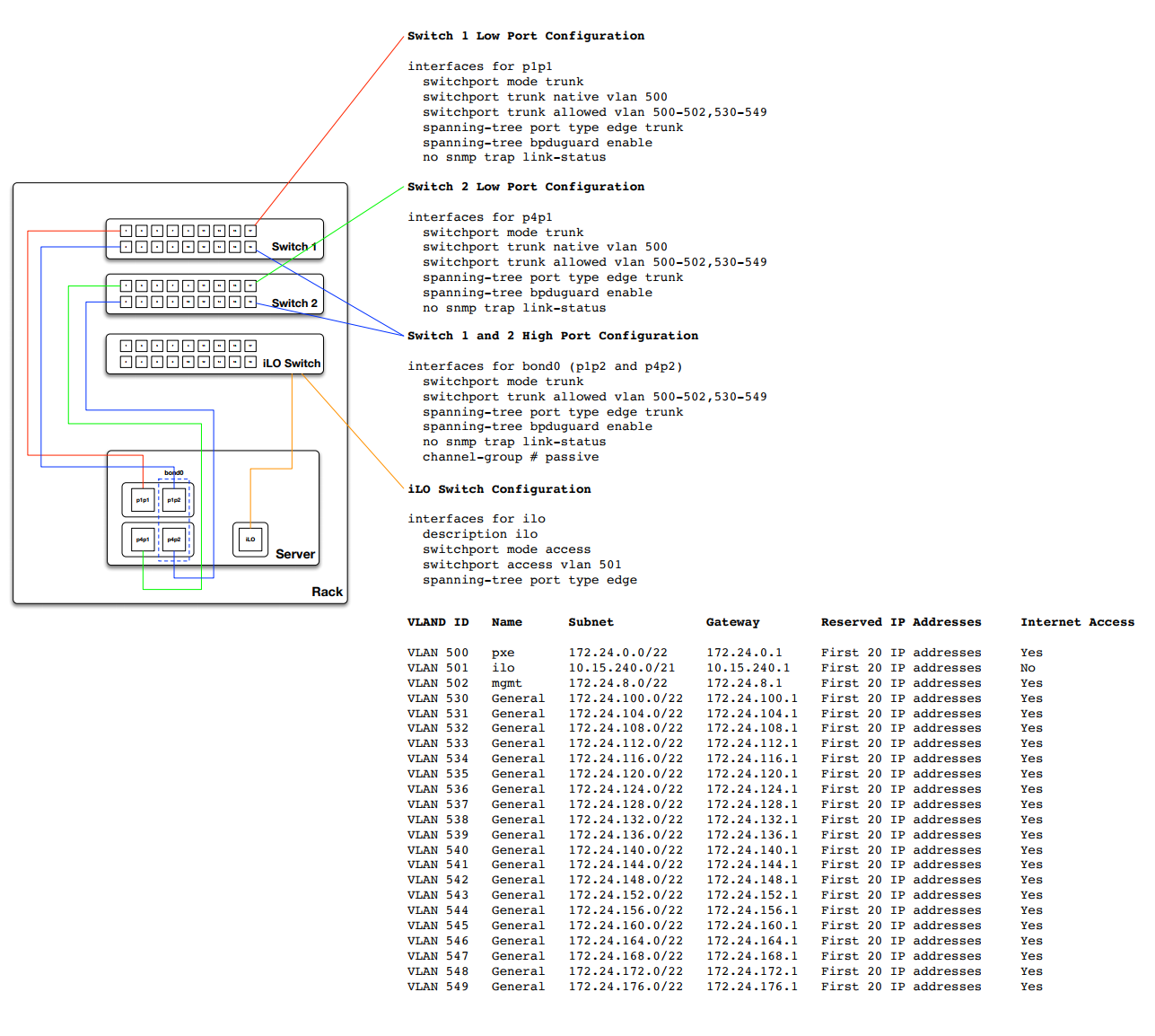
交换机端口配置
以下示例为交换机配置和电缆布局提供了很好的参考。 此示例可能比基本设置所需的更多,但可以调整为几乎任何配置。 此外,您需要调整此示例中注意到的 VLAN,以匹配您的环境。
网络 CIDR/VLAN 分配
此环境使用以下 CIDR 和 VLAN 分配。
网络 |
CIDR |
VLAN |
|---|---|---|
管理网络 |
172.29.236.0/22 |
10 |
隧道 (VXLAN) 网络 |
172.29.240.0/22 |
30 |
存储网络 |
172.29.244.0/22 |
20 |
IP 分配
此环境使用以下主机名和 IP 地址分配。
主机名 |
管理 IP |
隧道 (VXLAN) IP |
存储 IP |
|---|---|---|---|
infra1 |
172.29.236.11 |
172.29.240.11 |
|
compute1 |
172.29.236.12 |
172.29.240.12 |
172.29.244.12 |
storage1 |
172.29.236.13 |
172.29.244.13 |
主机网络配置
每个主机都需要实现正确的网络桥接。以下是 infra1 的 /etc/network/interfaces 文件。
注意
如果您的环境没有 eth0,而是有 p1p1 或其他接口名称,请确保将所有配置文件中的所有对 eth0 的引用替换为适当的名称。 同样适用于其他网络接口。
# This is a single-NIC configuration to implement the required bridges
# for OpenStack-Ansible. This illustrates the configuration of the first
# Infrastructure host and the IP addresses assigned should be adapted
# for implementation on the other hosts.
#
# After implementing this configuration, the host will need to be
# rebooted.

# Physical interface
auto eth0
iface eth0 inet manual

# Container/Host management VLAN interface
auto eth0.10
iface eth0.10 inet manual
    vlan-raw-device eth0

# OpenStack Networking VXLAN (tunnel/overlay) VLAN interface
auto eth0.30
iface eth0.30 inet manual
    vlan-raw-device eth0

# Storage network VLAN interface (optional)
auto eth0.20
iface eth0.20 inet manual
    vlan-raw-device eth0

# Container/Host management bridge
auto br-mgmt
iface br-mgmt inet static
    bridge_stp off
    bridge_waitport 0
    bridge_fd 0
    bridge_ports eth0.10
    address 172.29.236.11
    netmask 255.255.252.0
    gateway 172.29.236.1
    dns-nameservers 8.8.8.8 8.8.4.4

# Bind the External VIP
auto br-mgmt:0
iface br-mgmt:0 inet static
    address 172.29.236.10
    netmask 255.255.252.0

# OpenStack Networking VXLAN (tunnel/overlay) bridge
#
# The COMPUTE, NETWORK and INFRA nodes must have an IP address
# on this bridge.
#
auto br-vxlan
iface br-vxlan inet static
    bridge_stp off
    bridge_waitport 0
    bridge_fd 0
    bridge_ports eth0.30
    address 172.29.240.11
    netmask 255.255.252.0

# OpenStack Networking VLAN bridge
auto br-vlan
iface br-vlan inet manual
    bridge_stp off
    bridge_waitport 0
    bridge_fd 0
    bridge_ports eth0

# compute1 Network VLAN bridge
#auto br-vlan
#iface br-vlan inet manual
#    bridge_stp off
#    bridge_waitport 0
#    bridge_fd 0
#
# For tenant vlan support, create a veth pair to be used when the neutron
# agent is not containerized on the compute hosts. 'eth12' is the value used on
# the host_bind_override parameter of the br-vlan network section of the
# openstack_user_config example file. The veth peer name must match the value
# specified on the host_bind_override parameter.
#
# When the neutron agent is containerized it will use the container_interface
# value of the br-vlan network, which is also the same 'eth12' value.
#
# Create veth pair, do not abort if already exists
#    pre-up ip link add br-vlan-veth type veth peer name eth12 || true
# Set both ends UP
#    pre-up ip link set br-vlan-veth up
#    pre-up ip link set eth12 up
# Delete veth pair on DOWN
#    post-down ip link del br-vlan-veth || true
#    bridge_ports eth0 br-vlan-veth

# Storage bridge (optional)
#
# Only the COMPUTE and STORAGE nodes must have an IP address
# on this bridge. When used by infrastructure nodes, the
# IP addresses are assigned to containers which use this
# bridge.
#
auto br-storage
iface br-storage inet manual
    bridge_stp off
    bridge_waitport 0
    bridge_fd 0
    bridge_ports eth0.20

# compute1 Storage bridge
#auto br-storage
#iface br-storage inet static
#    bridge_stp off
#    bridge_waitport 0
#    bridge_fd 0
#    bridge_ports eth0.20
#    address 172.29.244.12
#    netmask 255.255.252.0
部署配置
环境布局
/etc/openstack_deploy/openstack_user_config.yml 文件定义了环境布局。
以下配置描述了此环境的布局。
---
cidr_networks:
  management: 172.29.236.0/22
  tunnel: 172.29.240.0/22
  storage: 172.29.244.0/22

used_ips:
  - "172.29.236.1,172.29.236.50"
  - "172.29.240.1,172.29.240.50"
  - "172.29.244.1,172.29.244.50"
  - "172.29.248.1,172.29.248.50"

global_overrides:
  # The internal and external VIP should be different IPs, however they
  # do not need to be on separate networks.
  external_lb_vip_address: 172.29.236.10
  internal_lb_vip_address: 172.29.236.11
  management_bridge: "br-mgmt"
  provider_networks:
    - network:
        container_bridge: "br-mgmt"
        container_type: "veth"
        container_interface: "eth1"
        ip_from_q: "management"
        type: "raw"
        group_binds:
          - all_containers
          - hosts
        is_management_address: true
    - network:
        container_bridge: "br-vxlan"
        container_type: "veth"
        container_interface: "eth10"
        ip_from_q: "tunnel"
        type: "vxlan"
        range: "1:1000"
        net_name: "vxlan"
        group_binds:
          - neutron_openvswitch_agent
    - network:
        container_bridge: "br-vlan"
        container_type: "veth"
        container_interface: "eth12"
        host_bind_override: "eth12"
        type: "flat"
        net_name: "physnet1"
        group_binds:
          - neutron_openvswitch_agent
    - network:
        container_bridge: "br-vlan"
        container_type: "veth"
        container_interface: "eth11"
        type: "vlan"
        range: "101:200,301:400"
        net_name: "physnet2"
        group_binds:
          - neutron_openvswitch_agent
    - network:
        container_bridge: "br-storage"
        container_type: "veth"
        container_interface: "eth2"
        ip_from_q: "storage"
        type: "raw"
        group_binds:
          - glance_api
          - cinder_api
          - cinder_volume
          - nova_compute

###
### Infrastructure
###

# galera, memcache, rabbitmq, utility
shared-infra_hosts:
  infra1:
    ip: 172.29.236.11

# repository (apt cache, python packages, etc)
repo-infra_hosts:
  infra1:
    ip: 172.29.236.11

# load balancer
load_balancer_hosts:
  infra1:
    ip: 172.29.236.11

###
### OpenStack
###

# keystone
identity_hosts:
  infra1:
    ip: 172.29.236.11

# cinder api services
storage-infra_hosts:
  infra1:
    ip: 172.29.236.11

# glance
image_hosts:
  infra1:
    ip: 172.29.236.11

# placement
placement-infra_hosts:
  infra1:
    ip: 172.29.236.11

# nova api, conductor, etc services
compute-infra_hosts:
  infra1:
    ip: 172.29.236.11

# heat
orchestration_hosts:
  infra1:
    ip: 172.29.236.11

# horizon
dashboard_hosts:
  infra1:
    ip: 172.29.236.11

# neutron server, agents (L3, etc)
network_hosts:
  infra1:
    ip: 172.29.236.11

# nova hypervisors
compute_hosts:
  compute1:
    ip: 172.29.236.12

# cinder storage host (LVM-backed)
storage_hosts:
  storage1:
    ip: 172.29.236.13
    container_vars:
      cinder_backends:
        limit_container_types: cinder_volume
        lvm:
          volume_group: cinder-volumes
          volume_driver: cinder.volume.drivers.lvm.LVMVolumeDriver
          volume_backend_name: LVM_iSCSI
          iscsi_ip_address: "172.29.244.13"
环境定制
/etc/openstack_deploy/env.d 中的可选部署文件允许定制 Ansible 组。这允许部署者设置服务是在容器中运行(默认),还是在主机上运行(裸机)。
对于此环境,您不需要 /etc/openstack_deploy/env.d 文件夹,因为 OpenStack-Ansible 设置的默认值是合适的。
用户变量
/etc/openstack_deploy/user_variables.yml 文件定义了默认变量的全局覆盖。
对于此环境,如果您想为内部和外部端点使用相同的 IP 地址,则需要确保内部和公共 OpenStack 端点使用相同的协议提供服务。 这可以通过以下内容完成
---
# This file contains an example of the global variable overrides
# which may need to be set for a production environment.

## OpenStack public endpoint protocol
openstack_service_publicuri_proto: http
