[ English | Indonesia | русский ]
提供商网络组
许多网络配置示例假定一个同构环境,其中每个服务器的配置都相同,并且可以假定所有主机上都具有一致的网络接口和接口名称。
OpenStack-Ansible (OSA) 的最新更改允许部署者定义适用于特定清单组的提供商网络,并允许在云环境中进行异构网络配置。可以创建新的组,或者可以使用现有的清单组,例如 network_hosts 或 compute_hosts,以确保某些配置仅应用于满足给定参数的主机。
在阅读本文档之前,请查看以下场景
此示例环境具有以下特性
一个
network_hosts组,包含三个合并的基础设施/网络(控制平面)主机一个
compute_hosts组,包含两个计算主机用作提供商网络接口的多个网络接口卡 (NIC),这些接口在主机之间有所不同
注意
组 network_hosts 和 compute_hosts 是 OpenStack-Ansible 部署中预定义的组。
下图演示了具有不同网络接口名称的服务器
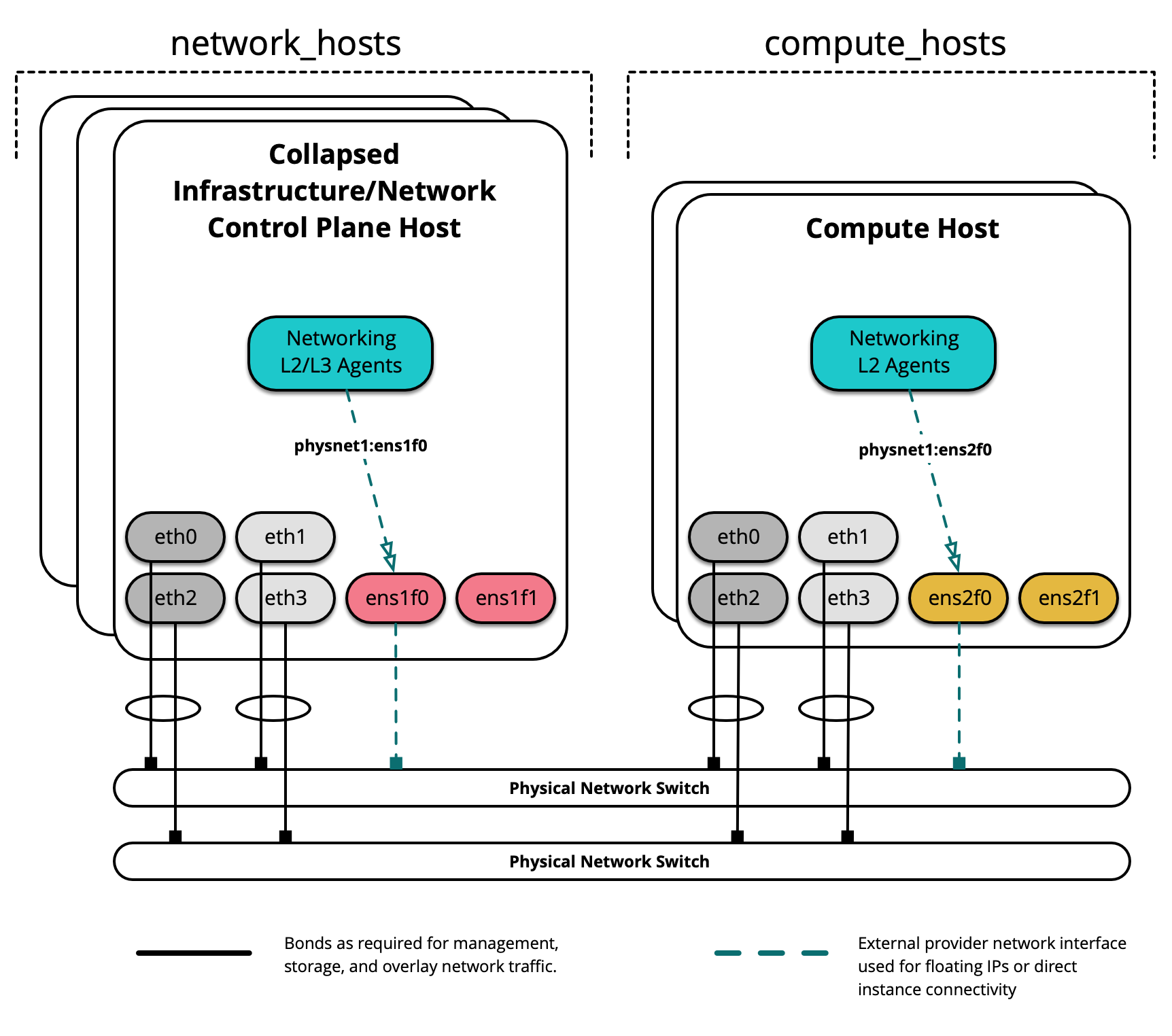
在此示例环境中,托管 L2/L3/DHCP 代理的基础设施/网络节点将使用名为 ens1f0 的接口用于提供商网络 physnet1。 另一方面,计算节点将使用名为 ens2f0 的接口用于相同的 physnet1 提供商网络。
注意
网络接口名称的差异可能是驱动程序和/或 PCI 插槽位置的差异所致。
部署配置
环境布局
/etc/openstack_deploy/openstack_user_config.yml 文件定义了环境布局。
以下配置描述了此环境的布局。
---
cidr_networks:
  management: 172.29.236.0/22
  tunnel: 172.29.240.0/22
  storage: 172.29.244.0/22

used_ips:
  - "172.29.236.1,172.29.236.50"
  - "172.29.240.1,172.29.240.50"
  - "172.29.244.1,172.29.244.50"
  - "172.29.248.1,172.29.248.50"

global_overrides:
  internal_lb_vip_address: 172.29.236.9
  #
  # The below domain name must resolve to an IP address
  # in the CIDR specified in haproxy_keepalived_external_vip_cidr.
  # If using different protocols (https/http) for the public/internal
  # endpoints the two addresses must be different.
  #
  external_lb_vip_address: openstack.example.com
  management_bridge: "br-mgmt"
  provider_networks:
    - network:
        container_bridge: "br-mgmt"
        container_type: "veth"
        container_interface: "eth1"
        ip_from_q: "management"
        type: "raw"
        group_binds:
          - all_containers
          - hosts
        is_management_address: true
    #
    # The below provider network defines details related to vxlan traffic,
    # including the range of VNIs to assign to project/tenant networks and
    # other attributes.
    #
    # The network details will be used to populate the respective network
    # configuration file(s) on the members of the listed groups.
    #
    - network:
        container_bridge: "br-vxlan"
        container_type: "veth"
        container_interface: "eth10"
        ip_from_q: "tunnel"
        type: "vxlan"
        range: "1:1000"
        net_name: "vxlan"
        group_binds:
          - network_hosts
          - compute_hosts
    #
    # The below provider network(s) define details related to a given provider
    # network: physnet1. Details include the name of the veth interface to
    # connect to the bridge when agent on_metal is False (container_interface)
    # or the physical interface to connect to the bridge when agent on_metal
    # is True (host_bind_override), as well as the network type. The provider
    # network name (net_name) will be used to build a physical network mapping
    # to a network interface; either container_interface or host_bind_override
    # (when defined).
    #
    # The network details will be used to populate the respective network
    # configuration file(s) on the members of the listed groups. In this
    # example, host_bind_override specifies the ens1f0 interface and applies
    # only to the members of network_hosts:
    #
    - network:
        container_bridge: "br-vlan"
        container_type: "veth"
        container_interface: "eth12"
        host_bind_override: "ens1f0"
        type: "flat"
        net_name: "physnet1"
        group_binds:
          - network_hosts
    - network:
        container_bridge: "br-vlan"
        container_type: "veth"
        container_interface: "eth11"
        host_bind_override: "ens1f0"
        type: "vlan"
        range: "101:200,301:400"
        net_name: "physnet2"
        group_binds:
          - network_hosts
    #
    # The below provider network(s) also define details related to the
    # physnet1 provider network. In this example, however, host_bind_override
    # specifies the ens2f0 interface and applies only to the members of
    # compute_hosts:
    #
    - network:
        container_bridge: "br-vlan"
        container_type: "veth"
        container_interface: "eth12"
        host_bind_override: "ens2f0"
        type: "flat"
        net_name: "physnet1"
        group_binds:
          - compute_hosts
    - network:
        container_bridge: "br-vlan"
        container_type: "veth"
        container_interface: "eth11"
        host_bind_override: "ens2f0"
        type: "vlan"
        range: "101:200,301:400"
        net_name: "physnet1"
        group_binds:
          - compute_hosts
    #
    # The below provider network defines details related to storage traffic.
    #
    - network:
        container_bridge: "br-storage"
        container_type: "veth"
        container_interface: "eth2"
        ip_from_q: "storage"
        type: "raw"
        group_binds:
          - glance_api
          - cinder_api
          - cinder_volume
          - nova_compute

###
### Infrastructure
###

# galera, memcache, rabbitmq, utility
shared-infra_hosts:
  infra1:
    ip: 172.29.236.11
  infra2:
    ip: 172.29.236.12
  infra3:
    ip: 172.29.236.13

# repository (apt cache, python packages, etc)
repo-infra_hosts:
  infra1:
    ip: 172.29.236.11
  infra2:
    ip: 172.29.236.12
  infra3:
    ip: 172.29.236.13

# load balancer
# Ideally the load balancer should not use the Infrastructure hosts.
# Dedicated hardware is best for improved performance and security.
load_balancer_hosts:
  infra1:
    ip: 172.29.236.11
  infra2:
    ip: 172.29.236.12
  infra3:
    ip: 172.29.236.13

###
### OpenStack
###

# keystone
identity_hosts:
  infra1:
    ip: 172.29.236.11
  infra2:
    ip: 172.29.236.12
  infra3:
    ip: 172.29.236.13

# cinder api services
storage-infra_hosts:
  infra1:
    ip: 172.29.236.11
  infra2:
    ip: 172.29.236.12
  infra3:
    ip: 172.29.236.13

# glance
# The settings here are repeated for each infra host.
# They could instead be applied as global settings in
# user_variables, but are left here to illustrate that
# each container could have different storage targets.
image_hosts:
  infra1:
    ip: 172.29.236.11
    container_vars:
      limit_container_types: glance
      glance_remote_client:
        - what: "172.29.244.15:/images"
          where: "/var/lib/glance/images"
          type: "nfs"
          options: "_netdev,auto"
  infra2:
    ip: 172.29.236.12
    container_vars:
      limit_container_types: glance
      glance_remote_client:
        - what: "172.29.244.15:/images"
          where: "/var/lib/glance/images"
          type: "nfs"
          options: "_netdev,auto"
  infra3:
    ip: 172.29.236.13
    container_vars:
      limit_container_types: glance
      glance_remote_client:
        - what: "172.29.244.15:/images"
          where: "/var/lib/glance/images"
          type: "nfs"
          options: "_netdev,auto"

# placement
placement-infra_hosts:
  infra1:
    ip: 172.29.236.11
  infra2:
    ip: 172.29.236.12
  infra3:
    ip: 172.29.236.13

# nova api, conductor, etc services
compute-infra_hosts:
  infra1:
    ip: 172.29.236.11
  infra2:
    ip: 172.29.236.12
  infra3:
    ip: 172.29.236.13

# heat
orchestration_hosts:
  infra1:
    ip: 172.29.236.11
  infra2:
    ip: 172.29.236.12
  infra3:
    ip: 172.29.236.13

# horizon
dashboard_hosts:
  infra1:
    ip: 172.29.236.11
  infra2:
    ip: 172.29.236.12
  infra3:
    ip: 172.29.236.13

# neutron server, agents (L3, etc)
network_hosts:
  infra1:
    ip: 172.29.236.11
  infra2:
    ip: 172.29.236.12
  infra3:
    ip: 172.29.236.13

# ceilometer (telemetry data collection)
metering-infra_hosts:
  infra1:
    ip: 172.29.236.11
  infra2:
    ip: 172.29.236.12
  infra3:
    ip: 172.29.236.13

# aodh (telemetry alarm service)
metering-alarm_hosts:
  infra1:
    ip: 172.29.236.11
  infra2:
    ip: 172.29.236.12
  infra3:
    ip: 172.29.236.13

# gnocchi (telemetry metrics storage)
metrics_hosts:
  infra1:
    ip: 172.29.236.11
  infra2:
    ip: 172.29.236.12
  infra3:
    ip: 172.29.236.13

# nova hypervisors
compute_hosts:
  compute1:
    ip: 172.29.236.16
  compute2:
    ip: 172.29.236.17

# ceilometer compute agent (telemetry data collection)
metering-compute_hosts:
  compute1:
    ip: 172.29.236.16
  compute2:
    ip: 172.29.236.17

# cinder volume hosts (NFS-backed)
# The settings here are repeated for each infra host.
# They could instead be applied as global settings in
# user_variables, but are left here to illustrate that
# each container could have different storage targets.
storage_hosts:
  infra1:
    ip: 172.29.236.11
    container_vars:
      cinder_backends:
        limit_container_types: cinder_volume
        nfs_volume:
          volume_backend_name: NFS_VOLUME1
          volume_driver: cinder.volume.drivers.nfs.NfsDriver
          nfs_mount_options: "rsize=65535,wsize=65535,timeo=1200,actimeo=120"
          nfs_shares_config: /etc/cinder/nfs_shares
          shares:
            - ip: "172.29.244.15"
              share: "/vol/cinder"
  infra2:
    ip: 172.29.236.12
    container_vars:
      cinder_backends:
        limit_container_types: cinder_volume
        nfs_volume:
          volume_backend_name: NFS_VOLUME1
          volume_driver: cinder.volume.drivers.nfs.NfsDriver
          nfs_mount_options: "rsize=65535,wsize=65535,timeo=1200,actimeo=120"
          nfs_shares_config: /etc/cinder/nfs_shares
          shares:
            - ip: "172.29.244.15"
              share: "/vol/cinder"
  infra3:
    ip: 172.29.236.13
    container_vars:
      cinder_backends:
        limit_container_types: cinder_volume
        nfs_volume:
          volume_backend_name: NFS_VOLUME1
          volume_driver: cinder.volume.drivers.nfs.NfsDriver
          nfs_mount_options: "rsize=65535,wsize=65535,timeo=1200,actimeo=120"
          nfs_shares_config: /etc/cinder/nfs_shares
          shares:
            - ip: "172.29.244.15"
              share: "/vol/cinder"
组中的主机 network_hosts 将把 physnet1 映射到 ens1f0 接口,而组中的主机 compute_hosts 将把 physnet1 映射到 ens2f0 接口。可以使用相同的格式在单独的定义中建立其他提供商映射。
使用主机之间不同接口的附加提供商接口定义 physnet2 可能如下所示
- network:
    container_bridge: "br-vlan2"
    container_type: "veth"
    container_interface: "eth13"
    host_bind_override: "ens1f1"
    type: "vlan"
    range: "2000:2999"
    net_name: "physnet2"
    group_binds:
      - network_hosts
- network:
    container_bridge: "br-vlan2"
    container_type: "veth"
    host_bind_override: "ens2f1"
    type: "vlan"
    range: "2000:2999"
    net_name: "physnet2"
    group_binds:
      - compute_hosts
注意
只有在 Neutron 代理在容器中运行时,才需要 container_interface 参数,并且在许多情况下可以排除。 container_bridge 和 container_type 参数也与基础设施容器相关,但为了遗留目的应保持定义。
自定义组
可以创建自定义清单组,以帮助在 OpenStack-Ansible 提供的内置组之外对主机进行分段。
在创建自定义组之前,请查看以下内容
下图演示了如何使用自定义组进一步细分主机
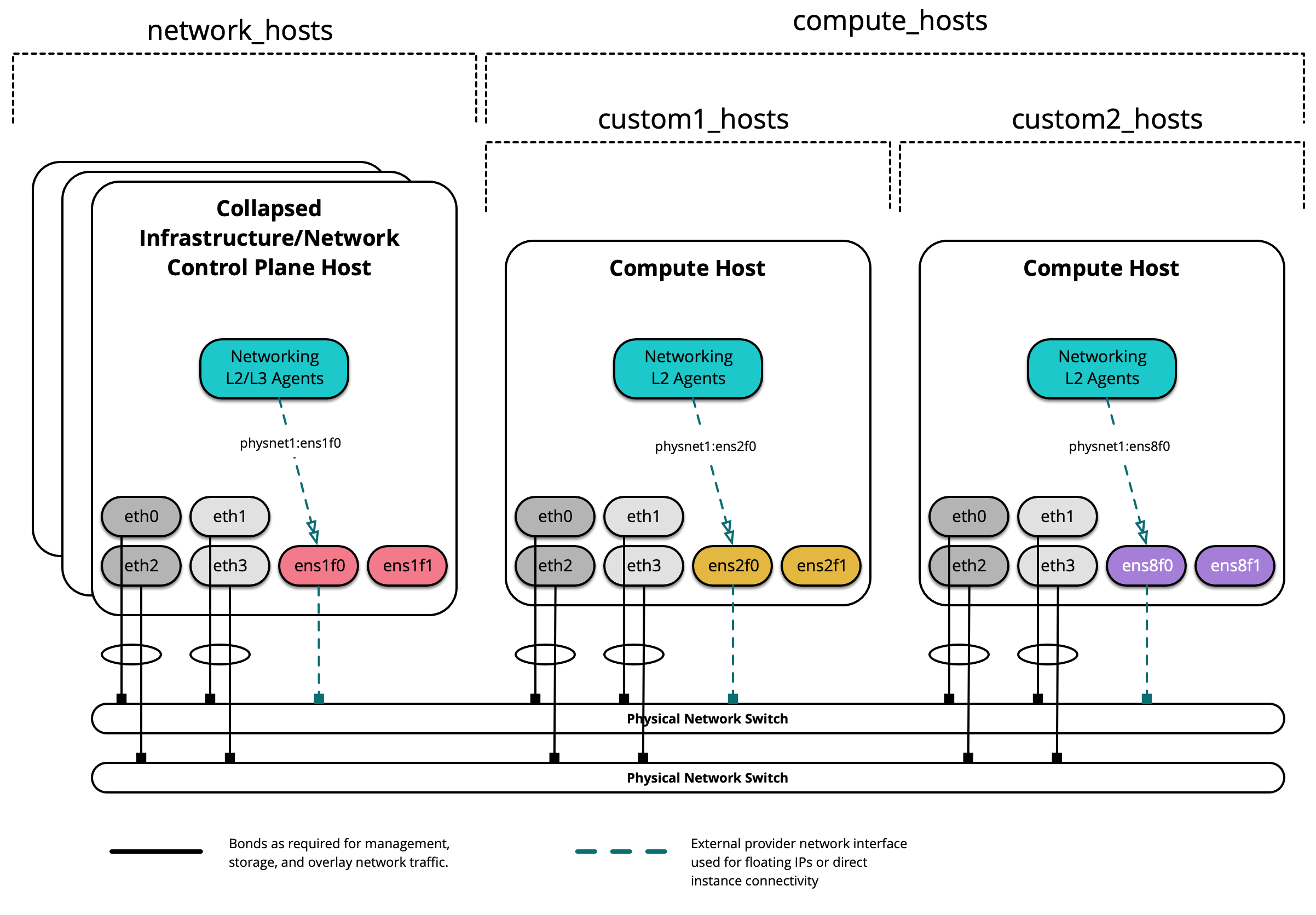
创建自定义组时,首先在 /etc/openstack_deploy/env.d/ 中创建一个骨架。 以下是为名为 custom2_hosts 的组创建的清单骨架的示例,该组将由裸机主机组成,并已在 /etc/openstack_deploy/env.d/custom2_hosts.yml 中创建。
---
physical_skel:
  custom2_containers:
    belongs_to:
      - all_containers
  custom2_hosts:
    belongs_to:
      - hosts
在 /etc/openstack_deploy/conf.d/ 中相应的文件中定义组及其成员。 以下是名为 custom2_hosts 的组的示例,该组在 /etc/openstack_deploy/conf.d/custom2_hosts.yml 中定义,包含一个成员 compute2
---
# custom example
custom2_hosts:
  compute2:
    ip: 172.29.236.17
然后可以在创建提供商网络时指定自定义组,如下所示
- network:
    container_bridge: "br-vlan"
    container_type: "veth"
    host_bind_override: "ens8f1"
    type: "vlan"
    range: "101:200,301:400"
    net_name: "physnet1"
    group_binds:
      - custom2_hosts
