网络架构
OpenStack-Ansible 支持多种不同的网络架构,可以使用单个网络接口用于非生产工作负载,也可以使用多个网络接口或绑定接口用于生产工作负载。
OpenStack-Ansible 参考架构使用 VLAN 在多个网络接口或绑定接口上划分流量。OpenStack-Ansible 部署中常用的网络如下表所示
网络 |
CIDR |
VLAN |
|---|---|---|
管理网络 |
172.29.236.0/22 |
10 |
覆盖网络 |
172.29.240.0/22 |
30 |
存储网络 |
172.29.244.0/22 |
20 |
管理 网络,也称为 容器 网络,提供对基础设施和在容器或裸机上运行的 OpenStack 服务的管理和通信。 管理 网络 使用专用的 VLAN,通常连接到 br-mgmt 桥,也可用作通过 SSH 与服务器交互的主要接口。
覆盖 网络,也称为 隧道 网络,提供主机之间的连接,用于使用 VXLAN、Geneve 或其他协议隧道封装流量。 覆盖 网络 使用专用的 VLAN,通常连接到 br-vxlan 桥。
存储 网络 提供从 OpenStack 服务(如 Cinder 和 Glance)到块存储的隔离访问。 存储 网络 使用专用的 VLAN,通常连接到 br-storage 桥。
注意
为每个网络列出的 CIDR 和 VLAN 仅为示例,在您的环境中可能不同。
可能需要以下用途的附加 VLAN:
用于浮动 IP 和实例的外部提供商网络
用于实例的自助服务项目网络
其他 OpenStack 服务
网络接口
配置网络接口
OpenStack-Ansible 不强制要求在主机上配置网络接口的任何特定方法。 您可以选择任何工具,例如 ifupdown、netplan、systemd-networkd、networkmanager 或其他特定于操作系统的工具。 唯一的条件是创建一组功能正常的网络桥接和接口,这些接口与 OpenStack-Ansible 期望的接口匹配,以及您选择为 neutron 物理接口指定的任何接口。
Ubuntu 系统的示例网络配置文件位于 etc/network 和 etc/netplan 中,基于 RHEL(或其他)系统的示例配置文件位于 etc/NetworkManager 中。 预计这些需要根据每个部署的特定要求进行调整。
如果您想将网络桥接和接口的管理委托给 OpenStack-Ansible,可以在 group_vars/lxc_hosts 中定义变量 openstack_hosts_systemd_networkd_devices 和 openstack_hosts_systemd_networkd_networks,例如
openstack_hosts_systemd_networkd_devices:
  - NetDev:
      Name: vlan-mgmt
      Kind: vlan
    VLAN:
      Id: 10
  - NetDev:
      Name: "{{ management_bridge }}"
      Kind: bridge
    Bridge:
      ForwardDelaySec: 0
      HelloTimeSec: 2
      MaxAgeSec: 12
      STP: off

openstack_hosts_systemd_networkd_networks:
  - interface: "vlan-mgmt"
    bridge: "{{ management_bridge }}"
  - interface: "{{ management_bridge }}"
    address: "{{ management_address }}"
    netmask: "255.255.252.0"
    gateway: "172.29.236.1"
  - interface: "eth0"
    vlan:
      - "vlan-mgmt"
    # NOTE: `05` is prefixed to filename to have precedence over netplan
    filename: 05-lxc-net-eth0
    address: "{{ ansible_facts['eth0']['ipv4']['address'] }}"
    netmask: "{{ ansible_facts['eth0']['ipv4']['netmask'] }}"
如果您需要为接口运行一些预/后挂钩,则需要为此配置 systemd 服务。 可以使用变量 openstack_hosts_systemd_services 来完成,如下所示:
openstack_hosts_systemd_services:
  - service_name: "{{ management_bridge }}-hook"
    state: started
    enabled: yes
    service_type: oneshot
    execstarts:
      - /bin/bash -c "/bin/echo 'management bridge is available'"
    config_overrides:
      Unit:
        Wants: network-online.target
        After: "{{ sys-subsystem-net-devices-{{ management_bridge }}.device }}"
        BindsTo: "{{ sys-subsystem-net-devices-{{ management_bridge }}.device }}"
设置网络接口上的 MTU
较大的 MTU 在某些网络上很有用,尤其是在存储网络上。 在 provider_networks 字典中添加一个 container_mtu 属性,以在连接到特定网络的容器网络接口上设置自定义 MTU
provider_networks:
  - network:
      group_binds:
        - glance_api
        - cinder_api
        - cinder_volume
        - nova_compute
      type: "raw"
      container_bridge: "br-storage"
      container_interface: "eth2"
      container_type: "veth"
      container_mtu: "9000"
      ip_from_q: "storage"
      static_routes:
        - cidr: 10.176.0.0/12
          gateway: 172.29.248.1
上面的示例通过将存储网络的 MTU 设置为 9000 来启用 巨帧。
注意
确保在整个网络路径上一致设置 MTU 非常重要。 这不仅包括容器接口,还包括基础桥接、物理网卡以及所有连接的网络设备,例如交换机、路由器和存储设备。 不一致的 MTU 设置可能导致分片或丢弃数据包,这会严重影响性能。
单个接口或绑定
OpenStack-Ansible 支持使用单个接口或一组绑定接口来承载 OpenStack 服务和实例的流量。
开放虚拟网络 (OVN)
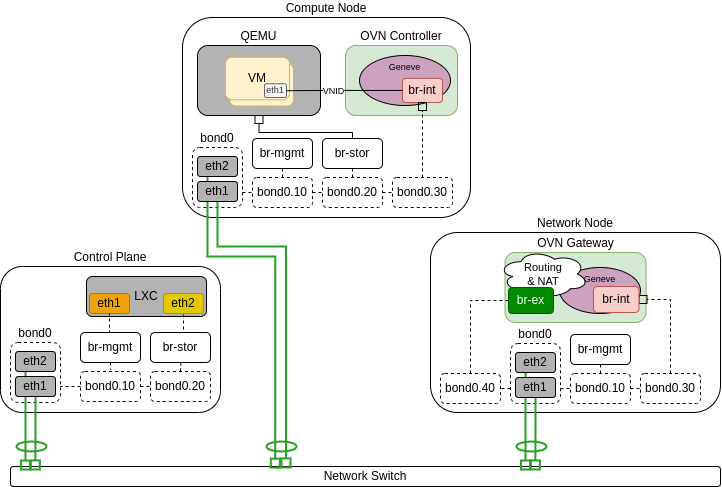
下图演示了使用单个绑定的 OVN 的主机。
在下面的场景中,只有网络节点连接到外部网络,计算节点没有外部连接,因此需要路由器才能进行外部连接
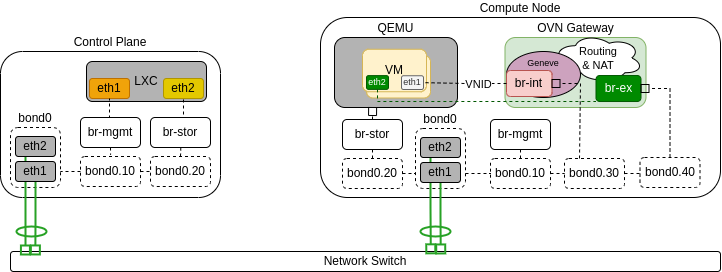
下图演示了用作 OVN 网关的计算节点。 它连接到公共网络,这使得能够不仅通过路由器,而且还可以直接将 VM 连接到公共网络
开放 vSwitch
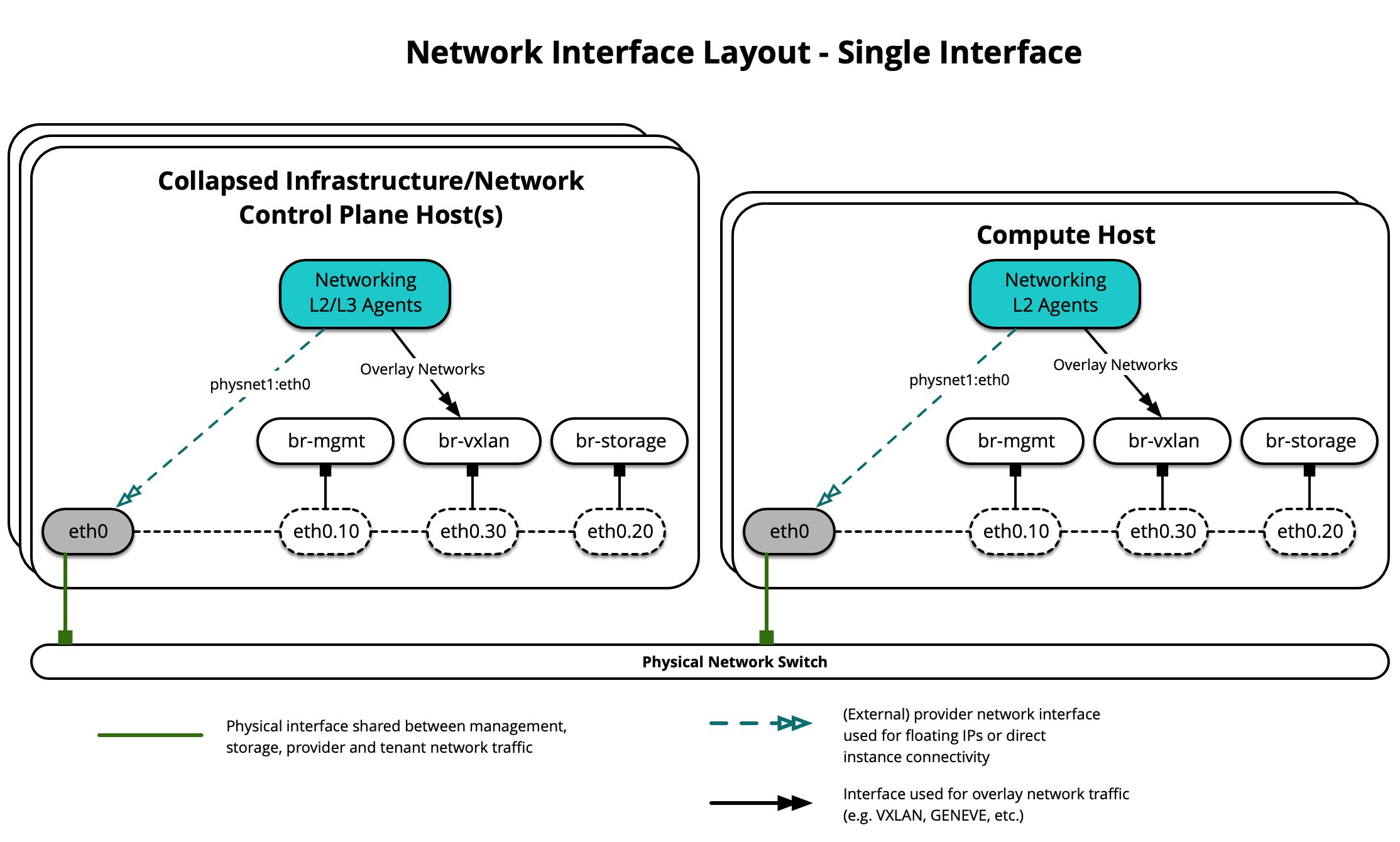
下图演示了使用单个接口的 OVS 场景的主机
下图演示了使用单个绑定的主机
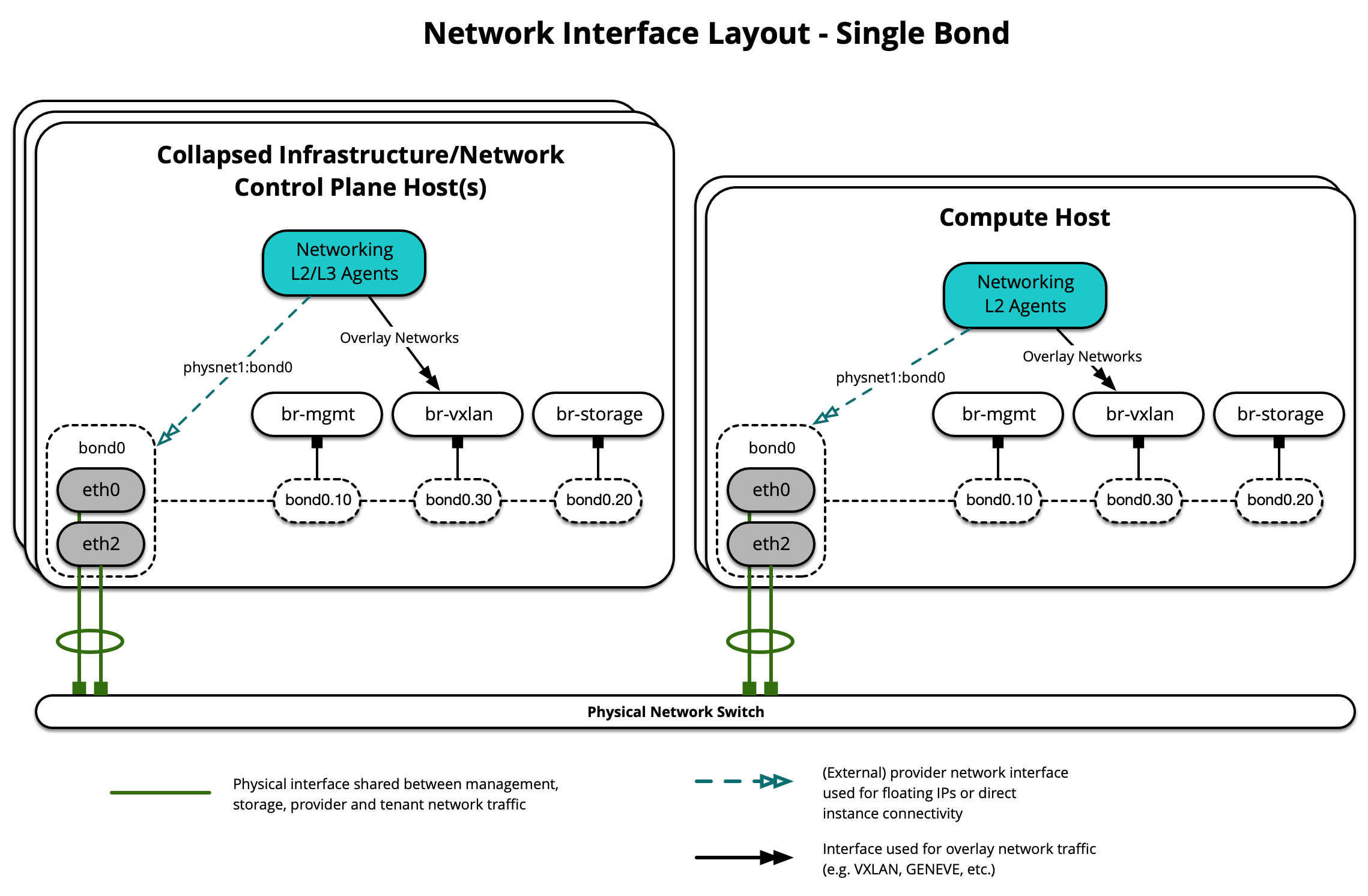
每台主机都需要实现正确的网络桥接。 以下是使用单个绑定的 infra1 的 /etc/network/interfaces 文件。
注意
如果您的环境没有 eth0,而是有 p1p1 或其他接口名称,请确保将所有配置文件中的所有对 eth0 的引用替换为适当的名称。 同样适用于其他网络接口。
# This is a multi-NIC bonded configuration to implement the required bridges
# for OpenStack-Ansible. This illustrates the configuration of the first
# Infrastructure host and the IP addresses assigned should be adapted
# for implementation on the other hosts.
#
# After implementing this configuration, the host will need to be
# rebooted.

# Assuming that eth0/1 and eth2/3 are dual port NIC's we pair
# eth0 with eth2 for increased resiliency in the case of one interface card
# failing.
auto eth0
iface eth0 inet manual
    bond-master bond0
    bond-primary eth0

auto eth1
iface eth1 inet manual

auto eth2
iface eth2 inet manual
    bond-master bond0

auto eth3
iface eth3 inet manual

# Create a bonded interface. Note that the "bond-slaves" is set to none. This
# is because the bond-master has already been set in the raw interfaces for
# the new bond0.
auto bond0
iface bond0 inet manual
    bond-slaves none
    bond-mode active-backup
    bond-miimon 100
    bond-downdelay 200
    bond-updelay 200

# Container/Host management VLAN interface
auto bond0.10
iface bond0.10 inet manual
    vlan-raw-device bond0

# OpenStack Networking VXLAN (tunnel/overlay) VLAN interface
auto bond0.30
iface bond0.30 inet manual
    vlan-raw-device bond0

# Storage network VLAN interface (optional)
auto bond0.20
iface bond0.20 inet manual
    vlan-raw-device bond0

# Container/Host management bridge
auto br-mgmt
iface br-mgmt inet static
    bridge_stp off
    bridge_waitport 0
    bridge_fd 0
    bridge_ports bond0.10
    address 172.29.236.11
    netmask 255.255.252.0
    gateway 172.29.236.1
    dns-nameservers 8.8.8.8 8.8.4.4

# OpenStack Networking VXLAN (tunnel/overlay) bridge
#
# Nodes hosting Neutron agents must have an IP address on this interface,
# including COMPUTE, NETWORK, and collapsed INFRA/NETWORK nodes.
#

auto br-vxlan
iface br-vxlan inet static
    bridge_stp off
    bridge_waitport 0
    bridge_fd 0
    bridge_ports bond0.30
    address 172.29.240.16
    netmask 255.255.252.0

# OpenStack Networking VLAN bridge
#
# The "br-vlan" bridge is no longer necessary for deployments unless Neutron
# agents are deployed in a container. Instead, a direct interface such as
# bond0 can be specified via the "host_bind_override" override when defining
# provider networks.
#
#auto br-vlan
#iface br-vlan inet manual
#    bridge_stp off
#    bridge_waitport 0
#    bridge_fd 0
#    bridge_ports bond0

# compute1 Network VLAN bridge
#auto br-vlan
#iface br-vlan inet manual
#    bridge_stp off
#    bridge_waitport 0
#    bridge_fd 0
#

# Storage bridge (optional)
#
# Only the COMPUTE and STORAGE nodes must have an IP address
# on this bridge. When used by infrastructure nodes, the
# IP addresses are assigned to containers which use this
# bridge.
#
auto br-storage
iface br-storage inet manual
    bridge_stp off
    bridge_waitport 0
    bridge_fd 0
    bridge_ports bond0.20

# compute1 Storage bridge
#auto br-storage
#iface br-storage inet static
#    bridge_stp off
#    bridge_waitport 0
#    bridge_fd 0
#    bridge_ports bond0.20
#    address 172.29.244.16
#    netmask 255.255.252.0
多个接口或绑定
OpenStack-Ansible 支持使用多个接口或一组绑定接口来承载 OpenStack 服务和实例的流量。
开放虚拟网络 (OVN)
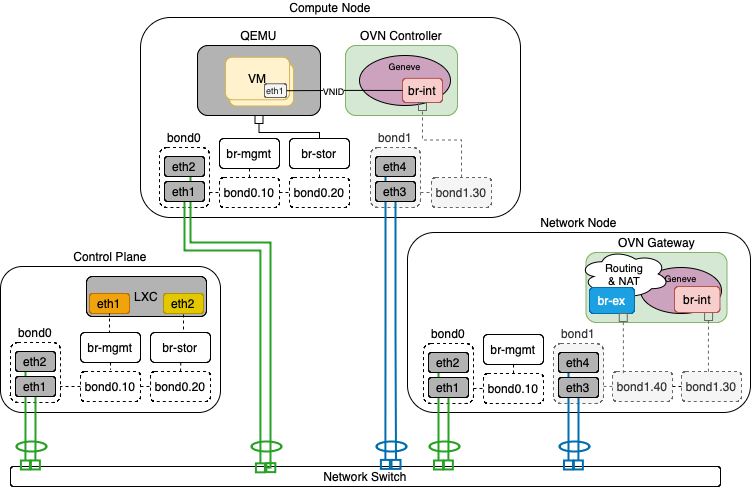
下图演示了使用多个绑定和 OVN 的主机。
在下面的场景中,只有网络节点连接到外部网络,计算节点没有外部连接,因此需要路由器才能进行外部连接
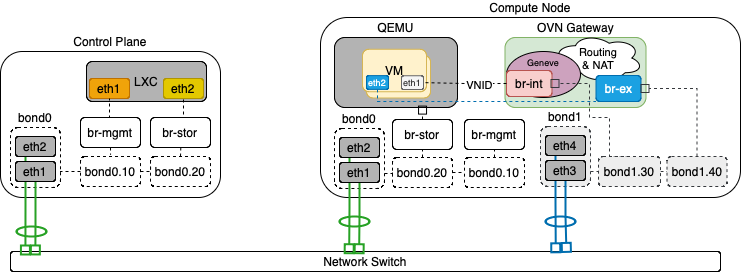
下图演示了用作 OVN 网关的计算节点。 它连接到公共网络,这使得能够不仅通过路由器,而且还可以直接将 VM 连接到公共网络
开放 vSwitch
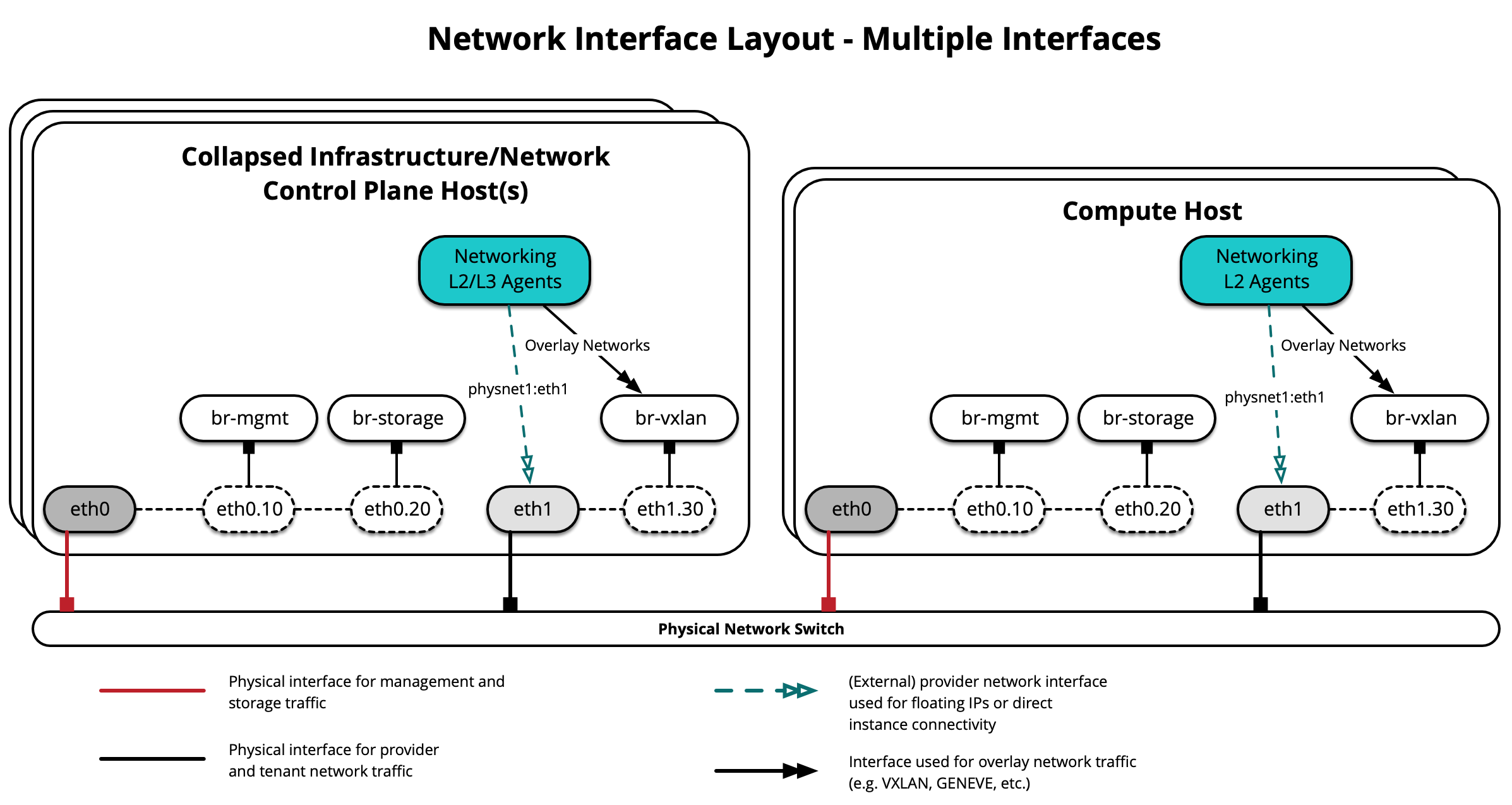
下图演示了使用多个接口的 OVS 场景的主机
下图演示了使用多个绑定的主机
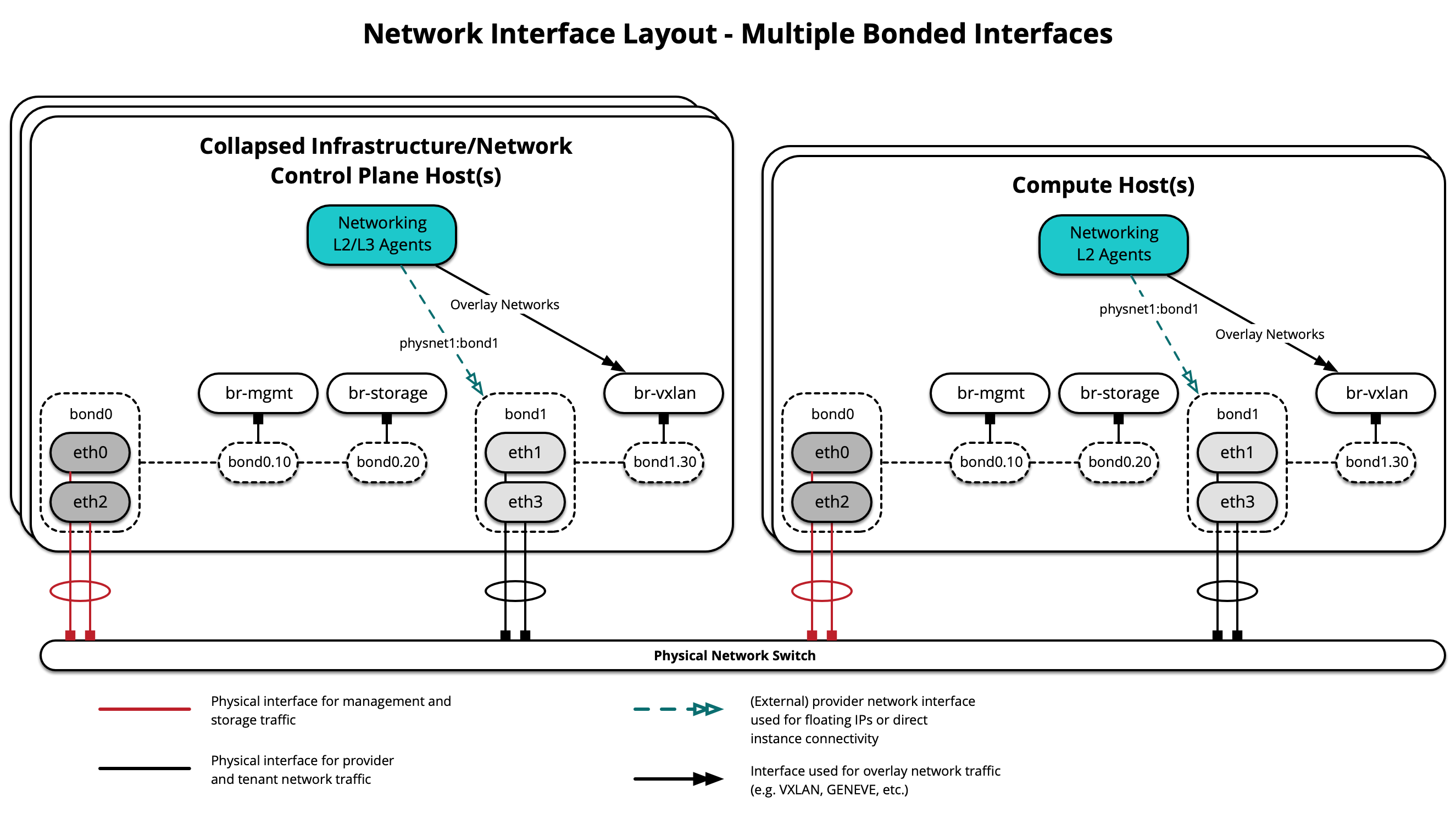
每台主机都需要实现正确的网络桥接。 以下是使用多个绑定接口的 infra1 的 /etc/network/interfaces 文件。
注意
如果您的环境没有 eth0,而是有 p1p1 或其他接口名称,请确保将所有配置文件中的所有对 eth0 的引用替换为适当的名称。 同样适用于其他网络接口。
# This is a multi-NIC bonded configuration to implement the required bridges
# for OpenStack-Ansible. This illustrates the configuration of the first
# Infrastructure host and the IP addresses assigned should be adapted
# for implementation on the other hosts.
#
# After implementing this configuration, the host will need to be
# rebooted.

# Assuming that eth0/1 and eth2/3 are dual port NIC's we pair
# eth0 with eth2 and eth1 with eth3 for increased resiliency
# in the case of one interface card failing.
auto eth0
iface eth0 inet manual
    bond-master bond0
    bond-primary eth0

auto eth1
iface eth1 inet manual
    bond-master bond1
    bond-primary eth1

auto eth2
iface eth2 inet manual
    bond-master bond0

auto eth3
iface eth3 inet manual
    bond-master bond1

# Create a bonded interface. Note that the "bond-slaves" is set to none. This
# is because the bond-master has already been set in the raw interfaces for
# the new bond0.
auto bond0
iface bond0 inet manual
    bond-slaves none
    bond-mode active-backup
    bond-miimon 100
    bond-downdelay 200
    bond-updelay 200

# This bond will carry VLAN and VXLAN traffic to ensure isolation from
# control plane traffic on bond0.
auto bond1
iface bond1 inet manual
    bond-slaves none
    bond-mode active-backup
    bond-miimon 100
    bond-downdelay 250
    bond-updelay 250

# Container/Host management VLAN interface
auto bond0.10
iface bond0.10 inet manual
    vlan-raw-device bond0

# OpenStack Networking VXLAN (tunnel/overlay) VLAN interface
auto bond1.30
iface bond1.30 inet manual
    vlan-raw-device bond1

# Storage network VLAN interface (optional)
auto bond0.20
iface bond0.20 inet manual
    vlan-raw-device bond0

# Container/Host management bridge
auto br-mgmt
iface br-mgmt inet static
    bridge_stp off
    bridge_waitport 0
    bridge_fd 0
    bridge_ports bond0.10
    address 172.29.236.11
    netmask 255.255.252.0
    gateway 172.29.236.1
    dns-nameservers 8.8.8.8 8.8.4.4

# OpenStack Networking VXLAN (tunnel/overlay) bridge
#
# Nodes hosting Neutron agents must have an IP address on this interface,
# including COMPUTE, NETWORK, and collapsed INFRA/NETWORK nodes.
#

auto br-vxlan
iface br-vxlan inet static
    bridge_stp off
    bridge_waitport 0
    bridge_fd 0
    bridge_ports bond1.30
    address 172.29.240.16
    netmask 255.255.252.0

# OpenStack Networking VLAN bridge
#
# The "br-vlan" bridge is no longer necessary for deployments unless Neutron
# agents are deployed in a container. Instead, a direct interface such as
# bond1 can be specified via the "host_bind_override" override when defining
# provider networks.
#
#auto br-vlan
#iface br-vlan inet manual
#    bridge_stp off
#    bridge_waitport 0
#    bridge_fd 0
#    bridge_ports bond1

# compute1 Network VLAN bridge
#auto br-vlan
#iface br-vlan inet manual
#    bridge_stp off
#    bridge_waitport 0
#    bridge_fd 0
#

# Storage bridge (optional)
#
# Only the COMPUTE and STORAGE nodes must have an IP address
# on this bridge. When used by infrastructure nodes, the
# IP addresses are assigned to containers which use this
# bridge.
#
auto br-storage
iface br-storage inet manual
    bridge_stp off
    bridge_waitport 0
    bridge_fd 0
    bridge_ports bond0.20

# compute1 Storage bridge
#auto br-storage
#iface br-storage inet static
#    bridge_stp off
#    bridge_waitport 0
#    bridge_fd 0
#    bridge_ports bond0.20
#    address 172.29.244.16
#    netmask 255.255.252.0
其他资源
有关如何正确配置不同部署场景的网络接口文件和 OpenStack-Ansible 配置文件,请参阅以下内容
有关网络代理和容器网络拓扑,请参阅以下内容
